
 在 TensorFlow.org 上查看 在 TensorFlow.org 上查看
|
 在 Google Colab 中运行 在 Google Colab 中运行
|
 在 GitHub 上查看源代码 在 GitHub 上查看源代码
|
 下载笔记本 下载笔记本
|
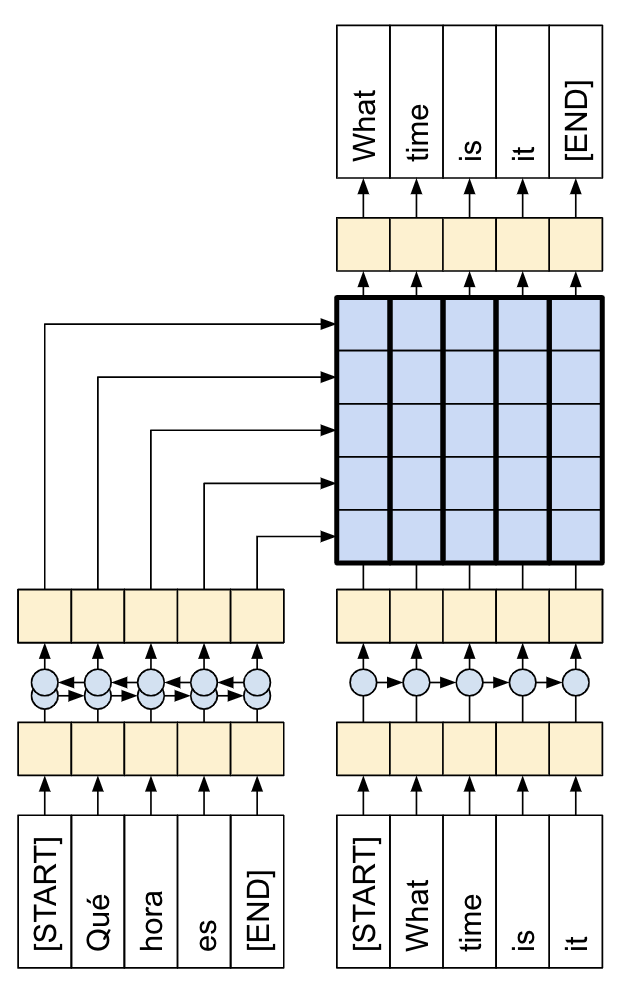
本教程演示了如何训练一个用于西班牙语到英语翻译的序列到序列 (seq2seq) 模型,该模型大致基于 基于注意力的神经机器翻译的有效方法 (Luong 等人,2015)。
|
| 本教程:由注意力机制连接的编码器/解码器。 |
|---|
虽然这种架构有点过时,但它仍然是一个非常有用的项目,可以帮助您更深入地了解序列到序列模型和注意力机制(在继续学习 Transformer 之前)。
本示例假设您对 TensorFlow 基础知识有一定的了解,低于 Keras 层级
在本笔记本中训练模型后,您将能够输入一个西班牙语句子,例如“¿todavia estan en casa?”,并返回英语翻译:“are you still at home?”。
生成的模型可以导出为 tf.saved_model,因此可以在其他 TensorFlow 环境中使用。
对于一个玩具示例来说,翻译质量还算不错,但生成的注意力图可能更有趣。这显示了模型在翻译时对输入句子的哪些部分进行了关注。

设置
pip install "tensorflow-text>=2.11"pip install einops
import numpy as np

import typing
from typing import Any, Tuple

import einops
import matplotlib.pyplot as plt
import matplotlib.ticker as ticker

import tensorflow as tf
import tensorflow_text as tf_text
本教程使用了大量的低级 API,很容易出现形状错误。此类用于在整个教程中检查形状。
数据
本教程使用 Anki 提供的语言数据集。此数据集包含以下格式的语言翻译对
May I borrow this book? ¿Puedo tomar prestado este libro?
他们提供了多种语言,但本示例使用英语-西班牙语数据集。
下载并准备数据集
为了方便起见,此数据集的副本托管在 Google Cloud 上,但您也可以下载自己的副本。下载数据集后,您需要执行以下步骤来准备数据
- 在每个句子中添加一个开始和结束标记。
- 通过删除特殊字符来清理句子。
- 创建一个词索引和反向词索引(字典,从词→id 和 id→词映射)。
- 将每个句子填充到最大长度。
# Download the file
import pathlib

path_to_zip = tf.keras.utils.get_file(
    'spa-eng.zip', origin='http://storage.googleapis.com/download.tensorflow.org/data/spa-eng.zip',
    extract=True)

path_to_file = pathlib.Path(path_to_zip).parent/'spa-eng/spa.txt'
def load_data(path):
  text = path.read_text(encoding='utf-8')

  lines = text.splitlines()
  pairs = [line.split('\t') for line in lines]

  context = np.array([context for target, context in pairs])
  target = np.array([target for target, context in pairs])

  return target, context
target_raw, context_raw = load_data(path_to_file)
print(context_raw[-1])
print(target_raw[-1])
创建一个 tf.data 数据集
从这些字符串数组中,您可以创建一个 tf.data.Dataset,该数据集可以有效地对字符串进行混洗和批处理
BUFFER_SIZE = len(context_raw)
BATCH_SIZE = 64

is_train = np.random.uniform(size=(len(target_raw),)) < 0.8

train_raw = (
    tf.data.Dataset
    .from_tensor_slices((context_raw[is_train], target_raw[is_train]))
    .shuffle(BUFFER_SIZE)
    .batch(BATCH_SIZE))
val_raw = (
    tf.data.Dataset
    .from_tensor_slices((context_raw[~is_train], target_raw[~is_train]))
    .shuffle(BUFFER_SIZE)
    .batch(BATCH_SIZE))
for example_context_strings, example_target_strings in train_raw.take(1):
  print(example_context_strings[:5])
  print()
  print(example_target_strings[:5])
  break
文本预处理
本教程的目标之一是构建一个可以导出为 tf.saved_model 的模型。为了使导出的模型有用,它应该接受 tf.string 输入,并返回 tf.string 输出:所有文本处理都在模型内部进行。主要使用 layers.TextVectorization 层。
标准化
该模型处理的是具有有限词汇量的多语言文本。因此,对输入文本进行标准化非常重要。
第一步是 Unicode 规范化,将带重音的字符拆分,并将兼容字符替换为其 ASCII 等效项。
tensorflow_text 包含一个 Unicode 规范化操作
example_text = tf.constant('¿Todavía está en casa?')

print(example_text.numpy())
print(tf_text.normalize_utf8(example_text, 'NFKD').numpy())
Unicode 规范化将是文本标准化函数的第一步
def tf_lower_and_split_punct(text):
  # Split accented characters.
  text = tf_text.normalize_utf8(text, 'NFKD')
  text = tf.strings.lower(text)
  # Keep space, a to z, and select punctuation.
  text = tf.strings.regex_replace(text, '[^ a-z.?!,¿]', '')
  # Add spaces around punctuation.
  text = tf.strings.regex_replace(text, '[.?!,¿]', r' \0 ')
  # Strip whitespace.
  text = tf.strings.strip(text)

  text = tf.strings.join(['[START]', text, '[END]'], separator=' ')
  return text
print(example_text.numpy().decode())
print(tf_lower_and_split_punct(example_text).numpy().decode())
文本向量化
此标准化函数将封装在 tf.keras.layers.TextVectorization 层中,该层将处理词汇提取和将输入文本转换为标记序列。
max_vocab_size = 5000

context_text_processor = tf.keras.layers.TextVectorization(
    standardize=tf_lower_and_split_punct,
    max_tokens=max_vocab_size,
    ragged=True)
The TextVectorization layer 和许多其他 Keras 预处理层 都有一个 adapt 方法。此方法读取训练数据的第一个 epoch,并且与 Model.fit 非常相似。此 adapt 方法根据数据初始化层。在这里,它确定词汇表
context_text_processor.adapt(train_raw.map(lambda context, target: context))

# Here are the first 10 words from the vocabulary:
context_text_processor.get_vocabulary()[:10]
那是西班牙语的 TextVectorization 层,现在构建并 .adapt() 英语层
target_text_processor = tf.keras.layers.TextVectorization(
    standardize=tf_lower_and_split_punct,
    max_tokens=max_vocab_size,
    ragged=True)

target_text_processor.adapt(train_raw.map(lambda context, target: target))
target_text_processor.get_vocabulary()[:10]
现在这些层可以将一批字符串转换为一批标记 ID
example_tokens = context_text_processor(example_context_strings)
example_tokens[:3, :]
The get_vocabulary 方法可用于将标记 ID 转换回文本
context_vocab = np.array(context_text_processor.get_vocabulary())
tokens = context_vocab[example_tokens[0].numpy()]
' '.join(tokens)
返回的标记 ID 是零填充的。这很容易转换为掩码
plt.subplot(1, 2, 1)
plt.pcolormesh(example_tokens.to_tensor())
plt.title('Token IDs')

plt.subplot(1, 2, 2)
plt.pcolormesh(example_tokens.to_tensor() != 0)
plt.title('Mask')
处理数据集
下面的 process_text 函数将字符串的 Datasets 转换为标记 ID 的 0 填充张量。它还将 (context, target) 对转换为 ((context, target_in), target_out) 对,用于使用 keras.Model.fit 进行训练。Keras 期望 (inputs, labels) 对,输入是 (context, target_in),标签是 target_out。 target_in 和 target_out 之间的区别在于它们相对于彼此偏移了一步,因此在每个位置,标签都是下一个标记。
def process_text(context, target):
  context = context_text_processor(context).to_tensor()
  target = target_text_processor(target)
  targ_in = target[:,:-1].to_tensor()
  targ_out = target[:,1:].to_tensor()
  return (context, targ_in), targ_out


train_ds = train_raw.map(process_text, tf.data.AUTOTUNE)
val_ds = val_raw.map(process_text, tf.data.AUTOTUNE)
这是第一批中每个序列的第一个序列
for (ex_context_tok, ex_tar_in), ex_tar_out in train_ds.take(1):
  print(ex_context_tok[0, :10].numpy())
  print()
  print(ex_tar_in[0, :10].numpy())
  print(ex_tar_out[0, :10].numpy())
编码器/解码器
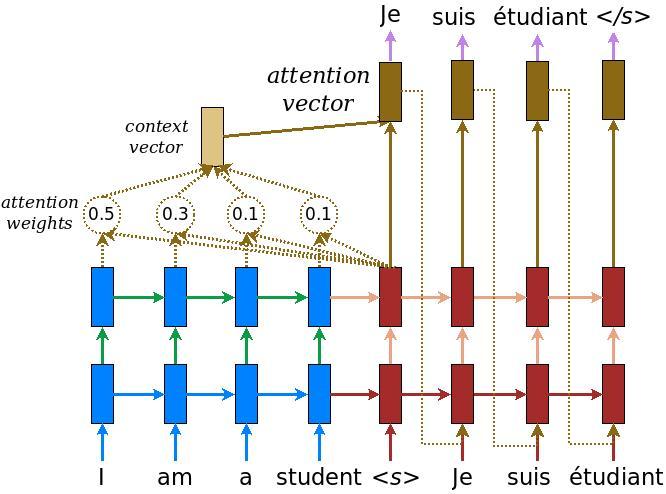
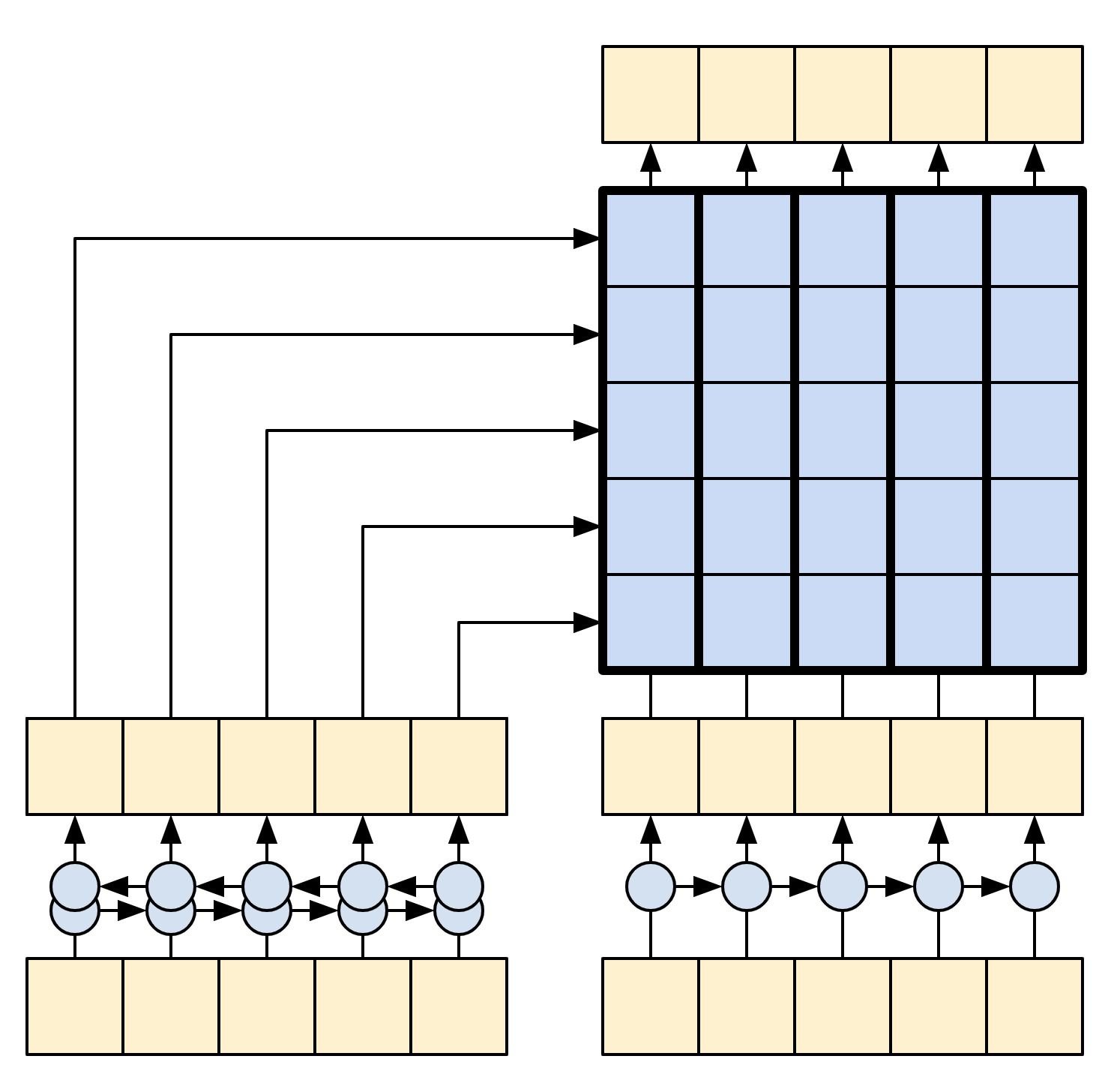
以下图表显示了模型的概述。在编码器都在左侧,解码器都在右侧。在每个时间步长,解码器的输出与编码器的输出相结合,以预测下一个词。
原始 [左侧] 包含一些额外的连接,这些连接有意从本教程的模型 [右侧] 中省略,因为它们通常是不必要的,并且难以实现。这些缺失的连接是
- 将编码器 RNN 的状态馈送到解码器 RNN
- 将注意力输出反馈到 RNN 的输入。
|
|
| 来自 基于注意力的神经机器翻译的有效方法 的原始模型 | 本教程的模型 |
|---|---|
在深入研究之前,为模型定义常量
UNITS = 256
编码器
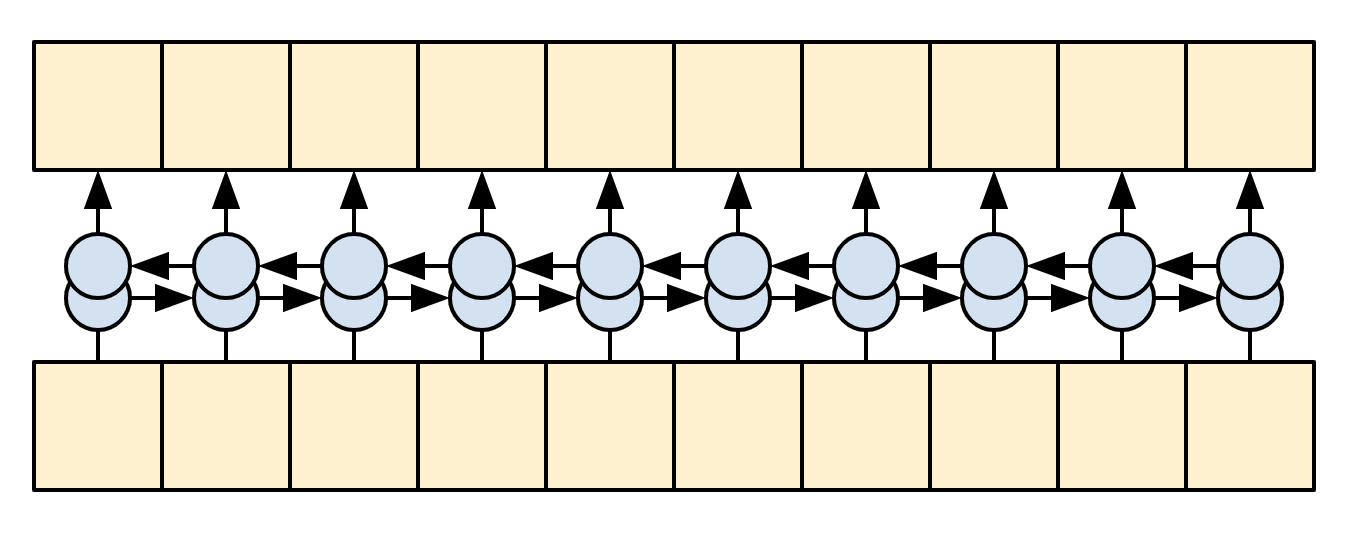
编码器的目标是将上下文序列处理成一系列向量,这些向量对于解码器在尝试预测每个时间步长的下一个输出时很有用。由于上下文序列是恒定的,因此对信息如何在编码器中流动没有限制,因此使用双向 RNN 来进行处理
|
| 双向 RNN |
|---|
编码器
- 接受标记 ID 列表(来自
context_text_processor)。 - 查找每个标记的嵌入向量(使用
layers.Embedding)。 - 将嵌入处理成新的序列(使用双向
layers.GRU)。 - 返回处理后的序列。这将传递给注意力头。
class Encoder(tf.keras.layers.Layer):
  def __init__(self, text_processor, units):
    super(Encoder, self).__init__()
    self.text_processor = text_processor
    self.vocab_size = text_processor.vocabulary_size()
    self.units = units

    # The embedding layer converts tokens to vectors
    self.embedding = tf.keras.layers.Embedding(self.vocab_size, units,
                                               mask_zero=True)

    # The RNN layer processes those vectors sequentially.
    self.rnn = tf.keras.layers.Bidirectional(
        merge_mode='sum',
        layer=tf.keras.layers.GRU(units,
                            # Return the sequence and state
                            return_sequences=True,
                            recurrent_initializer='glorot_uniform'))

  def call(self, x):
    shape_checker = ShapeChecker()
    shape_checker(x, 'batch s')

    # 2. The embedding layer looks up the embedding vector for each token.
    x = self.embedding(x)
    shape_checker(x, 'batch s units')

    # 3. The GRU processes the sequence of embeddings.
    x = self.rnn(x)
    shape_checker(x, 'batch s units')

    # 4. Returns the new sequence of embeddings.
    return x

  def convert_input(self, texts):
    texts = tf.convert_to_tensor(texts)
    if len(texts.shape) == 0:
      texts = tf.convert_to_tensor(texts)[tf.newaxis]
    context = self.text_processor(texts).to_tensor()
    context = self(context)
    return context
试一试
# Encode the input sequence.
encoder = Encoder(context_text_processor, UNITS)
ex_context = encoder(ex_context_tok)

print(f'Context tokens, shape (batch, s): {ex_context_tok.shape}')
print(f'Encoder output, shape (batch, s, units): {ex_context.shape}')
注意力层
注意力层允许解码器访问编码器提取的信息。它从整个上下文序列中计算一个向量,并将该向量添加到解码器的输出中。
从整个序列中计算单个向量最简单的方法是取序列的平均值(layers.GlobalAveragePooling1D)。注意力层类似,但计算上下文序列的加权平均值。权重由上下文和“查询”向量的组合计算得出。
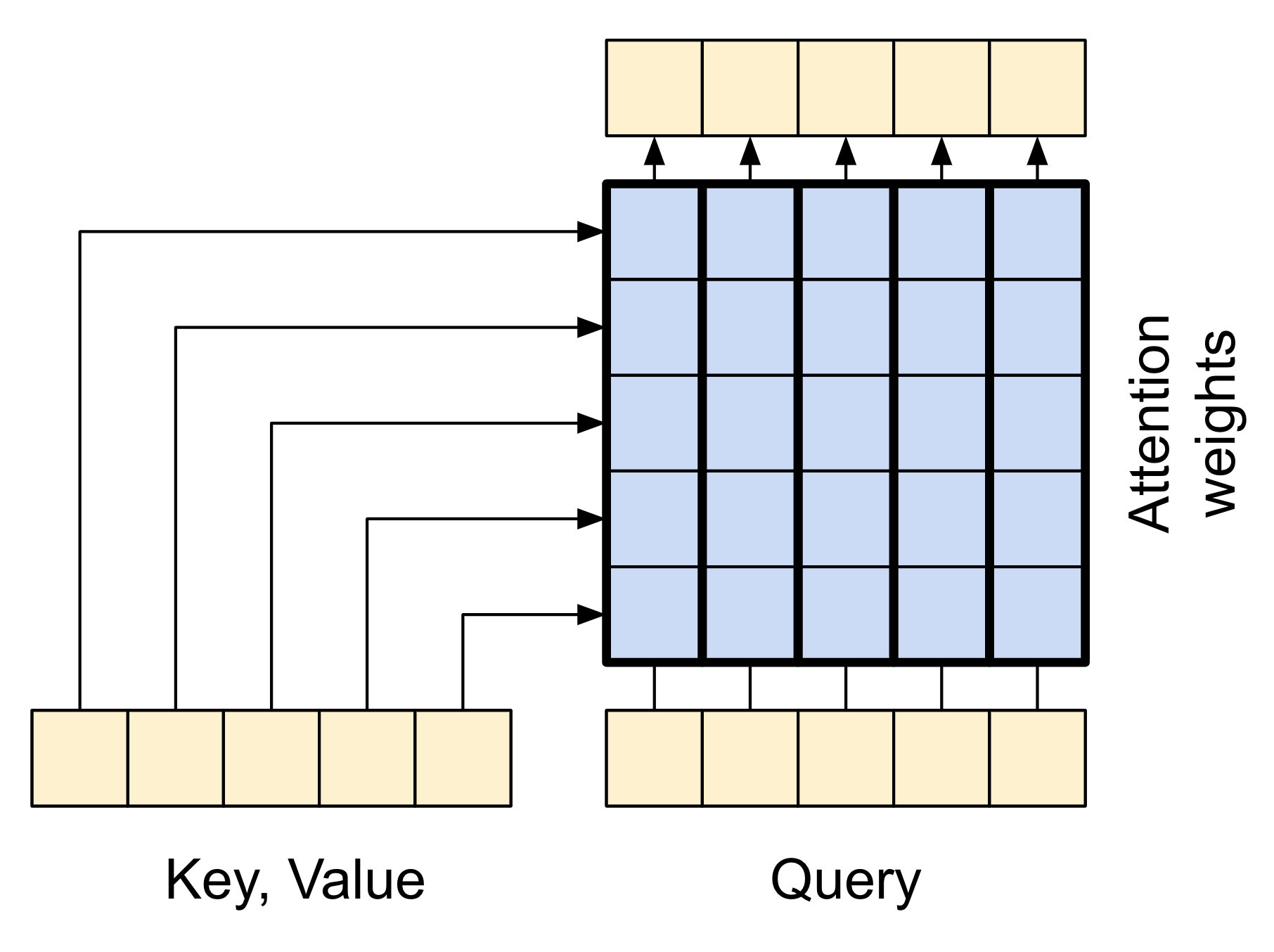
|
| 注意力层 |
|---|
class CrossAttention(tf.keras.layers.Layer):
  def __init__(self, units, **kwargs):
    super().__init__()
    self.mha = tf.keras.layers.MultiHeadAttention(key_dim=units, num_heads=1, **kwargs)
    self.layernorm = tf.keras.layers.LayerNormalization()
    self.add = tf.keras.layers.Add()

  def call(self, x, context):
    shape_checker = ShapeChecker()

    shape_checker(x, 'batch t units')
    shape_checker(context, 'batch s units')

    attn_output, attn_scores = self.mha(
        query=x,
        value=context,
        return_attention_scores=True)

    shape_checker(x, 'batch t units')
    shape_checker(attn_scores, 'batch heads t s')

    # Cache the attention scores for plotting later.
    attn_scores = tf.reduce_mean(attn_scores, axis=1)
    shape_checker(attn_scores, 'batch t s')
    self.last_attention_weights = attn_scores

    x = self.add([x, attn_output])
    x = self.layernorm(x)

    return x
attention_layer = CrossAttention(UNITS)

# Attend to the encoded tokens
embed = tf.keras.layers.Embedding(target_text_processor.vocabulary_size(),
                                  output_dim=UNITS, mask_zero=True)
ex_tar_embed = embed(ex_tar_in)

result = attention_layer(ex_tar_embed, ex_context)

print(f'Context sequence, shape (batch, s, units): {ex_context.shape}')
print(f'Target sequence, shape (batch, t, units): {ex_tar_embed.shape}')
print(f'Attention result, shape (batch, t, units): {result.shape}')
print(f'Attention weights, shape (batch, t, s):    {attention_layer.last_attention_weights.shape}')
注意力权重将在每个目标序列位置上,在上下文序列上加起来为 1。
attention_layer.last_attention_weights[0].numpy().sum(axis=-1)
以下是在 t=0 时,跨上下文序列的注意力权重
attention_weights = attention_layer.last_attention_weights
mask=(ex_context_tok != 0).numpy()

plt.subplot(1, 2, 1)
plt.pcolormesh(mask*attention_weights[:, 0, :])
plt.title('Attention weights')

plt.subplot(1, 2, 2)
plt.pcolormesh(mask)
plt.title('Mask');
由于小随机初始化,注意力权重最初都接近 1/(sequence_length)。随着训练的进行,模型将学习使这些权重不那么均匀。
解码器
解码器的任务是在目标序列的每个位置生成下一个标记的预测。
- 它查找目标序列中每个标记的嵌入。
- 它使用 RNN 处理目标序列,并跟踪它到目前为止生成的內容。
- 它使用 RNN 输出作为注意力层的“查询”,用于关注编码器的输出。
- 在输出的每个位置,它预测下一个标记。
在训练时,模型会预测每个位置的下一个词。因此,信息只能单向流经模型非常重要。解码器使用单向(而不是双向)RNN 处理目标序列。
在使用此模型进行推理时,它会一次生成一个词,并将这些词反馈到模型中。
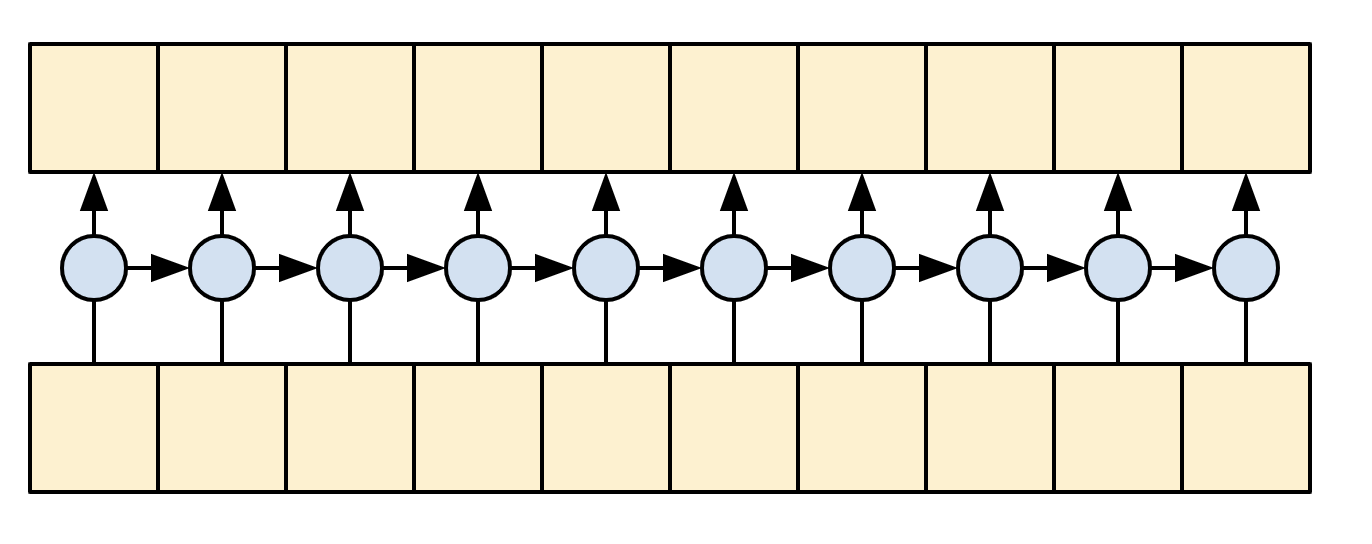
|
| 单向 RNN |
|---|
以下是 Decoder 类的初始化程序。初始化程序创建所有必要的层。
class Decoder(tf.keras.layers.Layer):
  @classmethod
  def add_method(cls, fun):
    setattr(cls, fun.__name__, fun)
    return fun

  def __init__(self, text_processor, units):
    super(Decoder, self).__init__()
    self.text_processor = text_processor
    self.vocab_size = text_processor.vocabulary_size()
    self.word_to_id = tf.keras.layers.StringLookup(
        vocabulary=text_processor.get_vocabulary(),
        mask_token='', oov_token='[UNK]')
    self.id_to_word = tf.keras.layers.StringLookup(
        vocabulary=text_processor.get_vocabulary(),
        mask_token='', oov_token='[UNK]',
        invert=True)
    self.start_token = self.word_to_id('[START]')
    self.end_token = self.word_to_id('[END]')

    self.units = units


    # 1. The embedding layer converts token IDs to vectors
    self.embedding = tf.keras.layers.Embedding(self.vocab_size,
                                               units, mask_zero=True)

    # 2. The RNN keeps track of what's been generated so far.
    self.rnn = tf.keras.layers.GRU(units,
                                   return_sequences=True,
                                   return_state=True,
                                   recurrent_initializer='glorot_uniform')

    # 3. The RNN output will be the query for the attention layer.
    self.attention = CrossAttention(units)

    # 4. This fully connected layer produces the logits for each
    # output token.
    self.output_layer = tf.keras.layers.Dense(self.vocab_size)
训练
接下来,call 方法接受 3 个参数
inputs- 一个context, x对,其中context- 是编码器输出的上下文。x- 是目标序列输入。
state- 可选,解码器上一个state输出(解码器 RNN 的内部状态)。传递来自上一次运行的状态以继续生成您停止的地方的文本。return_state- [默认值:False] - 将此设置为True以返回 RNN 状态。
@Decoder.add_method
def call(self,
         context, x,
         state=None,
         return_state=False):
  shape_checker = ShapeChecker()
  shape_checker(x, 'batch t')
  shape_checker(context, 'batch s units')

  # 1. Lookup the embeddings
  x = self.embedding(x)
  shape_checker(x, 'batch t units')

  # 2. Process the target sequence.
  x, state = self.rnn(x, initial_state=state)
  shape_checker(x, 'batch t units')

  # 3. Use the RNN output as the query for the attention over the context.
  x = self.attention(x, context)
  self.last_attention_weights = self.attention.last_attention_weights
  shape_checker(x, 'batch t units')
  shape_checker(self.last_attention_weights, 'batch t s')

  # Step 4. Generate logit predictions for the next token.
  logits = self.output_layer(x)
  shape_checker(logits, 'batch t target_vocab_size')

  if return_state:
    return logits, state
  else:
    return logits
这对于训练来说就足够了。创建一个解码器实例来测试
decoder = Decoder(target_text_processor, UNITS)
在训练中,您将像这样使用解码器
给定上下文和目标标记,对于每个目标标记,它都会预测下一个目标标记。
logits = decoder(ex_context, ex_tar_in)

print(f'encoder output shape: (batch, s, units) {ex_context.shape}')
print(f'input target tokens shape: (batch, t) {ex_tar_in.shape}')
print(f'logits shape shape: (batch, target_vocabulary_size) {logits.shape}')
推理
要将其用于推理,您将需要另外几个方法
@Decoder.add_method
def get_initial_state(self, context):
  batch_size = tf.shape(context)[0]
  start_tokens = tf.fill([batch_size, 1], self.start_token)
  done = tf.zeros([batch_size, 1], dtype=tf.bool)
  embedded = self.embedding(start_tokens)
  return start_tokens, done, self.rnn.get_initial_state(embedded)[0]
@Decoder.add_method
def tokens_to_text(self, tokens):
  words = self.id_to_word(tokens)
  result = tf.strings.reduce_join(words, axis=-1, separator=' ')
  result = tf.strings.regex_replace(result, '^ *\[START\] *', '')
  result = tf.strings.regex_replace(result, ' *\[END\] *$', '')
  return result
@Decoder.add_method
def get_next_token(self, context, next_token, done, state, temperature = 0.0):
  logits, state = self(
    context, next_token,
    state = state,
    return_state=True)

  if temperature == 0.0:
    next_token = tf.argmax(logits, axis=-1)
  else:
    logits = logits[:, -1, :]/temperature
    next_token = tf.random.categorical(logits, num_samples=1)

  # If a sequence produces an `end_token`, set it `done`
  done = done | (next_token == self.end_token)
  # Once a sequence is done it only produces 0-padding.
  next_token = tf.where(done, tf.constant(0, dtype=tf.int64), next_token)

  return next_token, done, state
有了这些额外的函数,您可以编写一个生成循环
# Setup the loop variables.
next_token, done, state = decoder.get_initial_state(ex_context)
tokens = []

for n in range(10):
  # Run one step.
  next_token, done, state = decoder.get_next_token(
      ex_context, next_token, done, state, temperature=1.0)
  # Add the token to the output.
  tokens.append(next_token)

# Stack all the tokens together.
tokens = tf.concat(tokens, axis=-1) # (batch, t)

# Convert the tokens back to a a string
result = decoder.tokens_to_text(tokens)
result[:3].numpy()
由于模型未经训练,因此它几乎以均匀的随机方式输出词汇表中的项目。
模型
现在您已经拥有了所有模型组件,将它们组合起来构建用于训练的模型
class Translator(tf.keras.Model):
  @classmethod
  def add_method(cls, fun):
    setattr(cls, fun.__name__, fun)
    return fun

  def __init__(self, units,
               context_text_processor,
               target_text_processor):
    super().__init__()
    # Build the encoder and decoder
    encoder = Encoder(context_text_processor, units)
    decoder = Decoder(target_text_processor, units)

    self.encoder = encoder
    self.decoder = decoder

  def call(self, inputs):
    context, x = inputs
    context = self.encoder(context)
    logits = self.decoder(context, x)

    #TODO(b/250038731): remove this
    try:
      # Delete the keras mask, so keras doesn't scale the loss+accuracy.
      del logits._keras_mask
    except AttributeError:
      pass

    return logits
在训练期间,模型将像这样使用
model = Translator(UNITS, context_text_processor, target_text_processor)

logits = model((ex_context_tok, ex_tar_in))

print(f'Context tokens, shape: (batch, s, units) {ex_context_tok.shape}')
print(f'Target tokens, shape: (batch, t) {ex_tar_in.shape}')
print(f'logits, shape: (batch, t, target_vocabulary_size) {logits.shape}')
训练
为了训练,您需要实现自己的掩码损失和准确度函数
def masked_loss(y_true, y_pred):
    # Calculate the loss for each item in the batch.
    loss_fn = tf.keras.losses.SparseCategoricalCrossentropy(
        from_logits=True, reduction='none')
    loss = loss_fn(y_true, y_pred)

    # Mask off the losses on padding.
    mask = tf.cast(y_true != 0, loss.dtype)
    loss *= mask

    # Return the total.
    return tf.reduce_sum(loss)/tf.reduce_sum(mask)
def masked_acc(y_true, y_pred):
    # Calculate the loss for each item in the batch.
    y_pred = tf.argmax(y_pred, axis=-1)
    y_pred = tf.cast(y_pred, y_true.dtype)

    match = tf.cast(y_true == y_pred, tf.float32)
    mask = tf.cast(y_true != 0, tf.float32)

    return tf.reduce_sum(match)/tf.reduce_sum(mask)
配置模型以进行训练
model.compile(optimizer='adam',
              loss=masked_loss,
              metrics=[masked_acc, masked_loss])
模型是随机初始化的,应该给出大致均匀的输出概率。因此,很容易预测指标的初始值应该是什么
vocab_size = 1.0 * target_text_processor.vocabulary_size()

{"expected_loss": tf.math.log(vocab_size).numpy(),
 "expected_acc": 1/vocab_size}
这应该大致匹配运行几个评估步骤返回的值
model.evaluate(val_ds, steps=20, return_dict=True)
history = model.fit(
    train_ds.repeat(),
    epochs=100,
    steps_per_epoch = 100,
    validation_data=val_ds,
    validation_steps = 20,
    callbacks=[
        tf.keras.callbacks.EarlyStopping(patience=3)])
plt.plot(history.history['loss'], label='loss')
plt.plot(history.history['val_loss'], label='val_loss')
plt.ylim([0, max(plt.ylim())])
plt.xlabel('Epoch #')
plt.ylabel('CE/token')
plt.legend()
plt.plot(history.history['masked_acc'], label='accuracy')
plt.plot(history.history['val_masked_acc'], label='val_accuracy')
plt.ylim([0, max(plt.ylim())])
plt.xlabel('Epoch #')
plt.ylabel('CE/token')
plt.legend()
翻译
现在模型已经过训练,实现一个函数来执行完整的 text => text 翻译。此代码与 推理示例 中的 解码器部分 基本相同,但这也捕获了注意力权重。
以下两个辅助方法用于将标记转换为文本,以及获取下一个标记
result = model.translate(['¿Todavía está en casa?']) # Are you still home
result[0].numpy().decode()
使用它生成注意力图
model.plot_attention('¿Todavía está en casa?') # Are you still home
翻译更多句子并绘制它们
%%time
# This is my life.
model.plot_attention('Esta es mi vida.')
%%time
 # Try to find out.'
model.plot_attention('Tratar de descubrir.')
短句子通常效果很好,但如果输入太长,模型就会失去注意力,不再提供合理的预测。主要有两个原因
- 模型使用教师强制训练,在每个步骤中都提供正确的标记,而不管模型的预测如何。如果模型有时被提供自己的预测,它可以变得更加健壮。
- 模型只能通过 RNN 状态访问其之前的输出。如果 RNN 状态丢失了它在上下文序列中的位置,那么模型就无法恢复。 Transformers 通过让解码器查看它到目前为止输出的内容来改进这一点。
原始数据按长度排序,因此尝试翻译最长的序列
long_text = context_raw[-1]

import textwrap
print('Expected output:\n', '\n'.join(textwrap.wrap(target_raw[-1])))
model.plot_attention(long_text)
The translate 函数对批次进行操作,因此如果您有多个要翻译的文本,可以一次性传递它们,这比逐个翻译效率高得多
inputs = [
    'Hace mucho frio aqui.', # "It's really cold here."
    'Esta es mi vida.', # "This is my life."
    'Su cuarto es un desastre.' # "His room is a mess"
]
%%time
for t in inputs:
  print(model.translate([t])[0].numpy().decode())

print()
%%time
result = model.translate(inputs)

print(result[0].numpy().decode())
print(result[1].numpy().decode())
print(result[2].numpy().decode())
print()
因此,总的来说,这个文本生成函数基本上完成了工作,但您只在 python 中使用它进行急切执行。接下来让我们尝试导出它
导出
如果您想导出此模型,则需要将 translate 方法包装在 tf.function 中。该实现将完成工作
class Export(tf.Module):
  def __init__(self, model):
    self.model = model

  @tf.function(input_signature=[tf.TensorSpec(dtype=tf.string, shape=[None])])
  def translate(self, inputs):
    return self.model.translate(inputs)
export = Export(model)
运行 tf.function 一次以编译它
%%time
_ = export.translate(tf.constant(inputs))
%%time
result = export.translate(tf.constant(inputs))

print(result[0].numpy().decode())
print(result[1].numpy().decode())
print(result[2].numpy().decode())
print()
现在函数已经过跟踪,可以使用 saved_model.save 导出它
%%time
tf.saved_model.save(export, 'translator',
                    signatures={'serving_default': export.translate})
%%time
reloaded = tf.saved_model.load('translator')
_ = reloaded.translate(tf.constant(inputs)) #warmup
%%time
result = reloaded.translate(tf.constant(inputs))

print(result[0].numpy().decode())
print(result[1].numpy().decode())
print(result[2].numpy().decode())
print()
[可选] 使用动态循环
值得注意的是,此初始实现并非最佳。它使用 python 循环
for _ in range(max_length):
  ...
  if tf.executing_eagerly() and tf.reduce_all(done):
    break
python 循环相对简单,但当 tf.function 将其转换为图形时,它会静态展开该循环。展开循环有两个缺点
- 它会创建循环体的
max_length个副本。因此,生成的图形需要更长的时间来构建、保存和加载。 - 您必须为
max_length选择一个固定值。 - 您无法从静态展开的循环中
break。tf.function版本将在每次调用时运行完整的max_length次迭代。这就是为什么break仅适用于急切执行的原因。这仍然比急切执行略快,但没有它可能快。
为了解决这些缺点,下面的 translate_dynamic 方法使用 tensorflow 循环
for t in tf.range(max_length):
  ...
  if tf.reduce_all(done):
      break
它看起来像 python 循环,但当您使用张量作为 for 循环(或 while 循环的条件)的输入时, tf.function 会使用诸如 tf.while_loop 之类的操作将其转换为动态循环。
这里不需要 max_length,只是为了防止模型卡住生成循环,例如: the united states of the united states of the united states...。
另一方面,要从这个动态循环中累积标记,不能简单地将它们追加到 Python 的 list 中,需要使用 tf.TensorArray
tokens = tf.TensorArray(tf.int64, size=1, dynamic_size=True)
...
for t in tf.range(max_length):
    ...
    tokens = tokens.write(t, next_token) # next_token shape is (batch, 1)
  ...
  tokens = tokens.stack()
  tokens = einops.rearrange(tokens, 't batch 1 -> batch t')
这个版本的代码效率要高得多。
在使用 Eager Execution 时,这个实现的性能与原始版本相当。
%%time
result = model.translate(inputs)

print(result[0].numpy().decode())
print(result[1].numpy().decode())
print(result[2].numpy().decode())
print()
但是,当你把它包装在 tf.function 中时,你会注意到两个区别。
class Export(tf.Module):
  def __init__(self, model):
    self.model = model

  @tf.function(input_signature=[tf.TensorSpec(dtype=tf.string, shape=[None])])
  def translate(self, inputs):
    return self.model.translate(inputs)
export = Export(model)
首先,它的跟踪速度快得多,因为它只创建了循环体的一个副本。
%%time
_ = export.translate(inputs)
tf.function 比使用 Eager Execution 运行快得多,在小输入情况下,它通常比展开版本快几倍,因为它可以跳出循环。
%%time
result = export.translate(inputs)

print(result[0].numpy().decode())
print(result[1].numpy().decode())
print(result[2].numpy().decode())
print()
所以也保存这个版本。
%%time
tf.saved_model.save(export, 'dynamic_translator',
                    signatures={'serving_default': export.translate})
%%time
reloaded = tf.saved_model.load('dynamic_translator')
_ = reloaded.translate(tf.constant(inputs)) #warmup
%%time
result = reloaded.translate(tf.constant(inputs))

print(result[0].numpy().decode())
print(result[1].numpy().decode())
print(result[2].numpy().decode())
print()
下一步
- 下载不同的数据集 来试验翻译,例如,英语到德语,或英语到法语。
- 尝试在更大的数据集上进行训练,或使用更多轮次。
- 尝试 Transformer 教程,它实现了类似的翻译任务,但使用 Transformer 层而不是 RNN。这个版本还使用
text.BertTokenizer来实现词片标记化。 - 访问
tensorflow_addons.seq2seq教程,它演示了实现这种序列到序列模型的更高级功能,例如seq2seq.BeamSearchDecoder。