
 在 TensorFlow.org 上查看 在 TensorFlow.org 上查看
|
 在 Google Colab 中运行 在 Google Colab 中运行
|
 在 GitHub 上查看 在 GitHub 上查看
|
 下载笔记本 下载笔记本
|
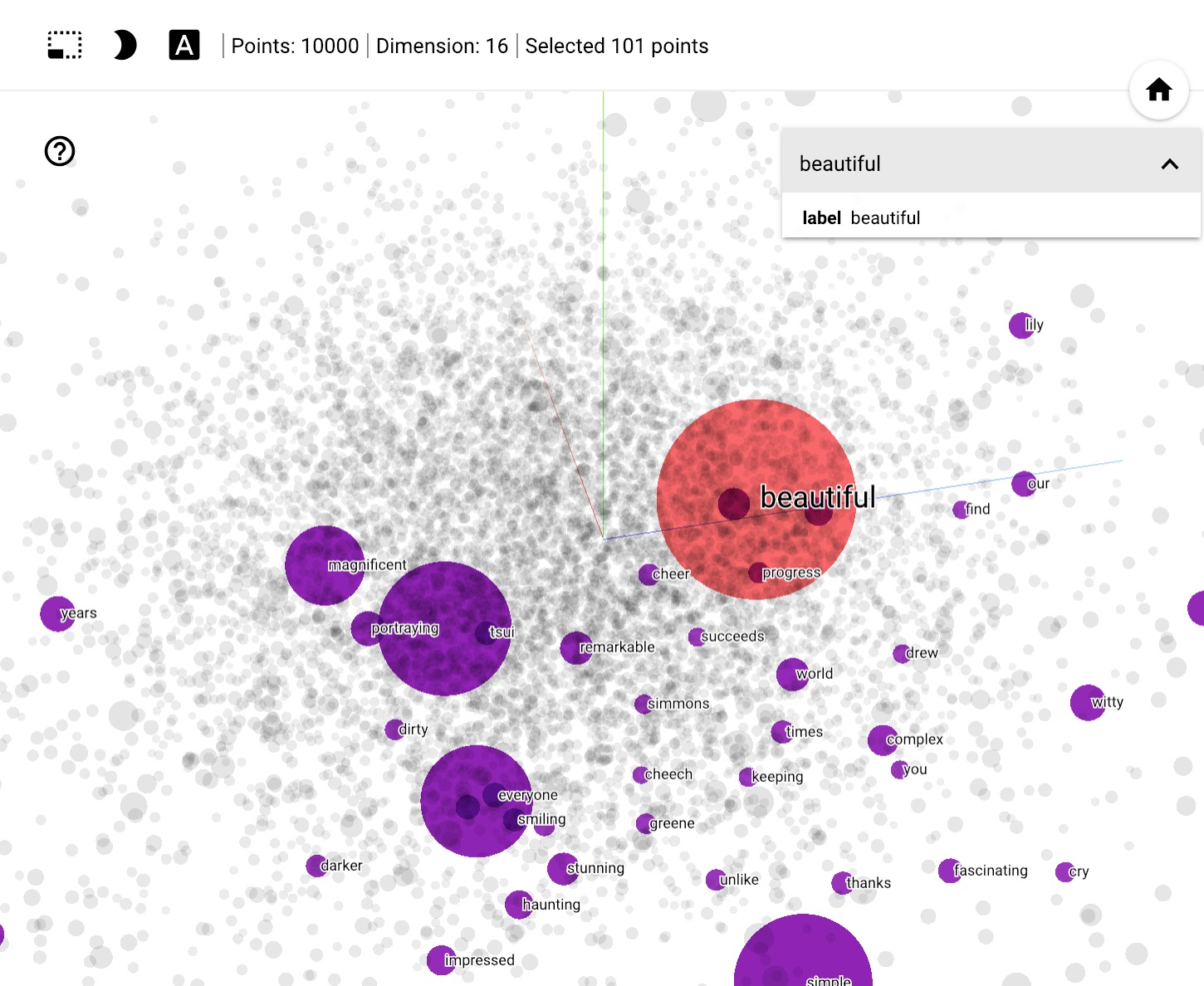
本教程包含词嵌入简介。您将使用简单的 Keras 模型为情绪分类任务训练自己的词嵌入,然后在嵌入投影仪中对其进行可视化(如下图所示)。
将文本表示为数字
机器学习模型将向量(数字数组)作为输入。使用文本时,在将文本输入模型之前,您必须首先想出一个将字符串转换为数字(或“向量化”文本)的策略。在本节中,您将了解三种执行此操作的策略。
独热编码
作为第一个想法,您可能会对词汇表中的每个单词进行“独热”编码。考虑句子“The cat sat on the mat”。此句子中的词汇表(或唯一单词)为 (cat, mat, on, sat, the)。要表示每个单词,您将创建一个零向量,其长度等于词汇表,然后在对应于单词的索引中放置一个 1。此方法在下图中所示。
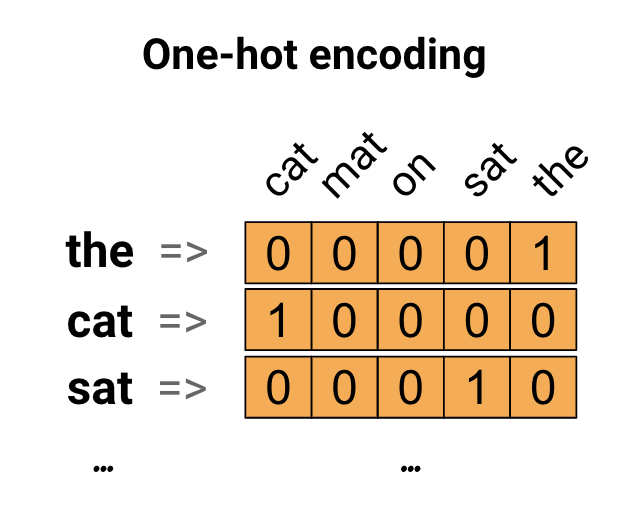
要创建一个包含句子编码的向量,您可以连接每个单词的独热向量。
使用唯一数字对每个单词进行编码
您可以尝试的第二种方法是使用唯一数字对每个单词进行编码。继续上面的示例,您可以将 1 分配给“cat”,2 分配给“mat”,依此类推。然后,您可以将句子“The cat sat on the mat”编码为一个密集向量,如 [5, 1, 4, 3, 5, 2]。这种方法很有效。现在,您不再使用稀疏向量,而是使用密集向量(其中所有元素都是满的)。
但是,这种方法有两个缺点
整数编码是任意的(它不会捕获单词之间的任何关系)。
对于模型来说,整数编码可能难以解释。例如,线性分类器为每个特征学习一个权重。由于两个单词的相似性与其编码的相似性之间没有关系,因此这种特征权重组合没有意义。
词嵌入
单词嵌入为我们提供了一种使用高效、密集的表示形式的方法,其中相似的单词具有相似的编码。重要的是,您不必手动指定此编码。嵌入是浮点值的密集向量(向量的长度是您指定的参数)。不是手动指定嵌入值,而是可训练参数(模型在训练期间学习的权重,就像模型学习密集层的权重一样)。通常看到 8 维(对于小数据集)的单词嵌入,在处理大型数据集时最多可达 1024 维。更高维度的嵌入可以捕获单词之间的细粒度关系,但需要更多的数据来学习。
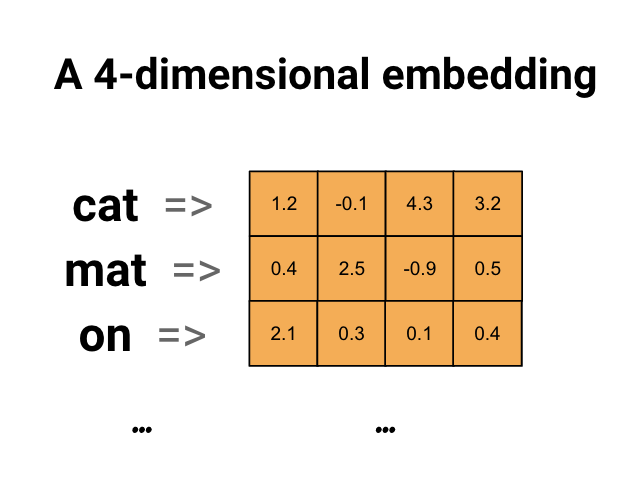
上面是词嵌入的图表。每个单词表示为浮点值的 4 维向量。另一种思考嵌入的方式是将其视为“查找表”。在学习了这些权重之后,你可以通过在表中查找它对应的稠密向量来对每个单词进行编码。
设置
import io
import os
import re
import shutil
import string
import tensorflow as tf

from tensorflow.keras import Sequential
from tensorflow.keras.layers import Dense, Embedding, GlobalAveragePooling1D
from tensorflow.keras.layers import TextVectorization
2023-11-16 14:12:20.714950: E external/local_xla/xla/stream_executor/cuda/cuda_dnn.cc:9261] Unable to register cuDNN factory: Attempting to register factory for plugin cuDNN when one has already been registered
2023-11-16 14:12:20.714992: E external/local_xla/xla/stream_executor/cuda/cuda_fft.cc:607] Unable to register cuFFT factory: Attempting to register factory for plugin cuFFT when one has already been registered
2023-11-16 14:12:20.716533: E external/local_xla/xla/stream_executor/cuda/cuda_blas.cc:1515] Unable to register cuBLAS factory: Attempting to register factory for plugin cuBLAS when one has already been registered
下载 IMDb 数据集
你将在整个教程中使用大型电影评论数据集。你将在该数据集上训练一个情感分类器模型,并在过程中从头开始学习嵌入。要详细了解如何从头开始加载数据集,请参阅加载文本教程。
使用 Keras 文件实用程序下载数据集并查看目录。
url = "https://ai.stanford.edu/~amaas/data/sentiment/aclImdb_v1.tar.gz"

dataset = tf.keras.utils.get_file("aclImdb_v1.tar.gz", url,
                                  untar=True, cache_dir='.',
                                  cache_subdir='')

dataset_dir = os.path.join(os.path.dirname(dataset), 'aclImdb')
os.listdir(dataset_dir)
Downloading data from https://ai.stanford.edu/~amaas/data/sentiment/aclImdb_v1.tar.gz
84125825/84125825 [==============================] - 2s 0us/step
['train', 'README', 'imdb.vocab', 'test', 'imdbEr.txt']
查看train/目录。它有pos和neg文件夹,其中包含分别标记为正面和负面的电影评论。你将使用pos和neg文件夹中的评论来训练二元分类模型。
train_dir = os.path.join(dataset_dir, 'train')
os.listdir(train_dir)
['urls_unsup.txt',
 'unsupBow.feat',
 'unsup',
 'pos',
 'labeledBow.feat',
 'neg',
 'urls_pos.txt',
 'urls_neg.txt']
train目录还包含其他文件夹,在创建训练数据集之前应将其删除。
remove_dir = os.path.join(train_dir, 'unsup')
shutil.rmtree(remove_dir)
接下来,使用tf.data.Dataset创建tf.keras.utils.text_dataset_from_directory。你可以在此文本分类教程中详细了解如何使用此实用程序。
使用train目录创建训练和验证数据集,其中 20% 用于验证。
batch_size = 1024
seed = 123
train_ds = tf.keras.utils.text_dataset_from_directory(
    'aclImdb/train', batch_size=batch_size, validation_split=0.2,
    subset='training', seed=seed)
val_ds = tf.keras.utils.text_dataset_from_directory(
    'aclImdb/train', batch_size=batch_size, validation_split=0.2,
    subset='validation', seed=seed)
Found 25000 files belonging to 2 classes.
Using 20000 files for training.
Found 25000 files belonging to 2 classes.
Using 5000 files for validation.
查看训练数据集中的几篇电影评论及其标签(1: 正面,0: 负面)。
for text_batch, label_batch in train_ds.take(1):
  for i in range(5):
    print(label_batch[i].numpy(), text_batch.numpy()[i])
0 b"Oh My God! Please, for the love of all that is holy, Do Not Watch This Movie! It it 82 minutes of my life I will never get back. Sure, I could have stopped watching half way through. But I thought it might get better. It Didn't. Anyone who actually enjoyed this movie is one seriously sick and twisted individual. No wonder us Australians/New Zealanders have a terrible reputation when it comes to making movies. Everything about this movie is horrible, from the acting to the editing. I don't even normally write reviews on here, but in this case I'll make an exception. I only wish someone had of warned me before I hired this catastrophe"
1 b'This movie is SOOOO funny!!! The acting is WONDERFUL, the Ramones are sexy, the jokes are subtle, and the plot is just what every high schooler dreams of doing to his/her school. I absolutely loved the soundtrack as well as the carefully placed cynicism. If you like monty python, You will love this film. This movie is a tad bit "grease"esk (without all the annoying songs). The songs that are sung are likable; you might even find yourself singing these songs once the movie is through. This musical ranks number two in musicals to me (second next to the blues brothers). But please, do not think of it as a musical per say; seeing as how the songs are so likable, it is hard to tell a carefully choreographed scene is taking place. I think of this movie as more of a comedy with undertones of romance. You will be reminded of what it was like to be a rebellious teenager; needless to say, you will be reminiscing of your old high school days after seeing this film. Highly recommended for both the family (since it is a very youthful but also for adults since there are many jokes that are funnier with age and experience.'
0 b"Alex D. Linz replaces Macaulay Culkin as the central figure in the third movie in the Home Alone empire. Four industrial spies acquire a missile guidance system computer chip and smuggle it through an airport inside a remote controlled toy car. Because of baggage confusion, grouchy Mrs. Hess (Marian Seldes) gets the car. She gives it to her neighbor, Alex (Linz), just before the spies turn up. The spies rent a house in order to burglarize each house in the neighborhood until they locate the car. Home alone with the chicken pox, Alex calls 911 each time he spots a theft in progress, but the spies always manage to elude the police while Alex is accused of making prank calls. The spies finally turn their attentions toward Alex, unaware that he has rigged devices to cleverly booby-trap his entire house. Home Alone 3 wasn't horrible, but probably shouldn't have been made, you can't just replace Macauley Culkin, Joe Pesci, or Daniel Stern. Home Alone 3 had some funny parts, but I don't like when characters are changed in a movie series, view at own risk."
0 b"There's a good movie lurking here, but this isn't it. The basic idea is good: to explore the moral issues that would face a group of young survivors of the apocalypse. But the logic is so muddled that it's impossible to get involved.<br /><br />For example, our four heroes are (understandably) paranoid about catching the mysterious airborne contagion that's wiped out virtually all of mankind. Yet they wear surgical masks some times, not others. Some times they're fanatical about wiping down with bleach any area touched by an infected person. Other times, they seem completely unconcerned.<br /><br />Worse, after apparently surviving some weeks or months in this new kill-or-be-killed world, these people constantly behave like total newbs. They don't bother accumulating proper equipment, or food. They're forever running out of fuel in the middle of nowhere. They don't take elementary precautions when meeting strangers. And after wading through the rotting corpses of the entire human race, they're as squeamish as sheltered debutantes. You have to constantly wonder how they could have survived this long... and even if they did, why anyone would want to make a movie about them.<br /><br />So when these dweebs stop to agonize over the moral dimensions of their actions, it's impossible to take their soul-searching seriously. Their actions would first have to make some kind of minimal sense.<br /><br />On top of all this, we must contend with the dubious acting abilities of Chris Pine. His portrayal of an arrogant young James T Kirk might have seemed shrewd, when viewed in isolation. But in Carriers he plays on exactly that same note: arrogant and boneheaded. It's impossible not to suspect that this constitutes his entire dramatic range.<br /><br />On the positive side, the film *looks* excellent. It's got an over-sharp, saturated look that really suits the southwestern US locale. But that can't save the truly feeble writing nor the paper-thin (and annoying) characters. Even if you're a fan of the end-of-the-world genre, you should save yourself the agony of watching Carriers."
0 b'I saw this movie at an actual movie theater (probably the \\(2.00 one) with my cousin and uncle. We were around 11 and 12, I guess, and really into scary movies. I remember being so excited to see it because my cool uncle let us pick the movie (and we probably never got to do that again!) and sooo disappointed afterwards!! Just boring and not scary. The only redeeming thing I can remember was Corky Pigeon from Silver Spoons, and that wasn\'t all that great, just someone I recognized. I\'ve seen bad movies before and this one has always stuck out in my mind as the worst. This was from what I can recall, one of the most boring, non-scary, waste of our collective \\)6, and a waste of film. I have read some of the reviews that say it is worth a watch and I say, "Too each his own", but I wouldn\'t even bother. Not even so bad it\'s good.'
配置数据集以提高性能
在加载数据时,应使用以下两种重要方法来确保 I/O 不会变成阻塞。
.cache()在从磁盘加载数据后将其保留在内存中。这将确保数据集在训练模型时不会成为瓶颈。如果数据集太大而无法放入内存,你还可以使用此方法创建一个高性能的磁盘缓存,这比读取许多小文件更有效。
.prefetch()在训练时重叠数据预处理和模型执行。
你可以在数据性能指南中了解有关这两种方法的更多信息,以及如何将数据缓存到磁盘。
AUTOTUNE = tf.data.AUTOTUNE

train_ds = train_ds.cache().prefetch(buffer_size=AUTOTUNE)
val_ds = val_ds.cache().prefetch(buffer_size=AUTOTUNE)
使用嵌入层
Keras 使得使用词嵌入变得容易。看看嵌入层。
嵌入层可以理解为一个查找表,它将整数索引(代表特定单词)映射到稠密向量(它们的嵌入)。嵌入的维度(或宽度)是你可以在上面进行试验的参数,以了解哪些最适合你的问题,这与你在密集层中试验神经元数量的方式非常相似。
# Embed a 1,000 word vocabulary into 5 dimensions.
embedding_layer = tf.keras.layers.Embedding(1000, 5)
当你创建一个嵌入层时,嵌入的权重会被随机初始化(就像任何其他层一样)。在训练期间,它们通过反向传播逐渐调整。一旦训练完成,学习到的词嵌入将大致编码单词之间的相似性(因为它们是针对你的模型训练的特定问题而学习的)。
如果你将一个整数传递给嵌入层,结果将用嵌入表中的向量替换每个整数
result = embedding_layer(tf.constant([1, 2, 3]))
result.numpy()
array([[ 0.01709319, -0.04993289,  0.02275733, -0.02546182, -0.0471513 ],
       [ 0.0270309 , -0.0087757 ,  0.00154114, -0.04307872, -0.04515076],
       [-0.01847412, -0.00480195, -0.04222688, -0.04952321,  0.01182619]],
      dtype=float32)
对于文本或序列问题,嵌入层采用形状为(samples, sequence_length)的整数的 2D 张量,其中每个条目都是一个整数序列。它可以嵌入可变长度的序列。你可以将形状为(32, 10)(32 个长度为 10 的序列的批次)或(64, 15)(64 个长度为 15 的序列的批次)的批次馈送到上面的嵌入层。
返回的张量比输入多一个轴,嵌入向量沿新的最后一个轴对齐。将(2, 3)输入批次传递给它,输出为(2, 3, N)
result = embedding_layer(tf.constant([[0, 1, 2], [3, 4, 5]]))
result.shape
TensorShape([2, 3, 5])
当输入一批序列时,嵌入层会返回一个 3D 浮点张量,其形状为 (samples, sequence_length, embedding_dimensionality)。要将此可变长度序列转换为固定表示,有多种标准方法。可以在将其传递到密集层之前使用 RNN、注意力或池化层。本教程使用池化,因为它最简单。使用 RNN 进行文本分类 教程是不错的后续步骤。
文本预处理
接下来,定义情感分类模型所需的预处理步骤。使用所需参数初始化 TextVectorization 层,以对电影评论进行矢量化。您可以在 文本分类 教程中了解有关使用此层的更多信息。
# Create a custom standardization function to strip HTML break tags '<br />'.
def custom_standardization(input_data):
  lowercase = tf.strings.lower(input_data)
  stripped_html = tf.strings.regex_replace(lowercase, '<br />', ' ')
  return tf.strings.regex_replace(stripped_html,
                                  '[%s]' % re.escape(string.punctuation), '')


# Vocabulary size and number of words in a sequence.
vocab_size = 10000
sequence_length = 100

# Use the text vectorization layer to normalize, split, and map strings to
# integers. Note that the layer uses the custom standardization defined above.
# Set maximum_sequence length as all samples are not of the same length.
vectorize_layer = TextVectorization(
    standardize=custom_standardization,
    max_tokens=vocab_size,
    output_mode='int',
    output_sequence_length=sequence_length)

# Make a text-only dataset (no labels) and call adapt to build the vocabulary.
text_ds = train_ds.map(lambda x, y: x)
vectorize_layer.adapt(text_ds)
创建分类模型
使用 Keras Sequential API 定义情感分类模型。在本例中,它是一个“连续词袋”风格的模型。
TextVectorization层将字符串转换为词汇索引。您已经将vectorize_layer初始化为 TextVectorization 层,并通过在text_ds上调用adapt来构建其词汇。现在,vectorize_layer 可以用作端到端分类模型的第一层,将转换后的字符串馈送到嵌入层。Embedding层采用整数编码词汇,并查找每个单词索引的嵌入向量。这些向量在模型训练时学习。这些向量为输出数组添加了一个维度。生成的维度为:(batch, sequence, embedding)。通过对序列维度求平均,
GlobalAveragePooling1D层为每个示例返回一个固定长度的输出向量。这允许模型以最简单的方式处理可变长度的输入。固定长度的输出向量通过一个具有 16 个隐藏单元的全连接 (
Dense) 层进行管道传输。最后一层与一个单一输出节点紧密相连。
embedding_dim=16

model = Sequential([
  vectorize_layer,
  Embedding(vocab_size, embedding_dim, name="embedding"),
  GlobalAveragePooling1D(),
  Dense(16, activation='relu'),
  Dense(1)
])
编译并训练模型
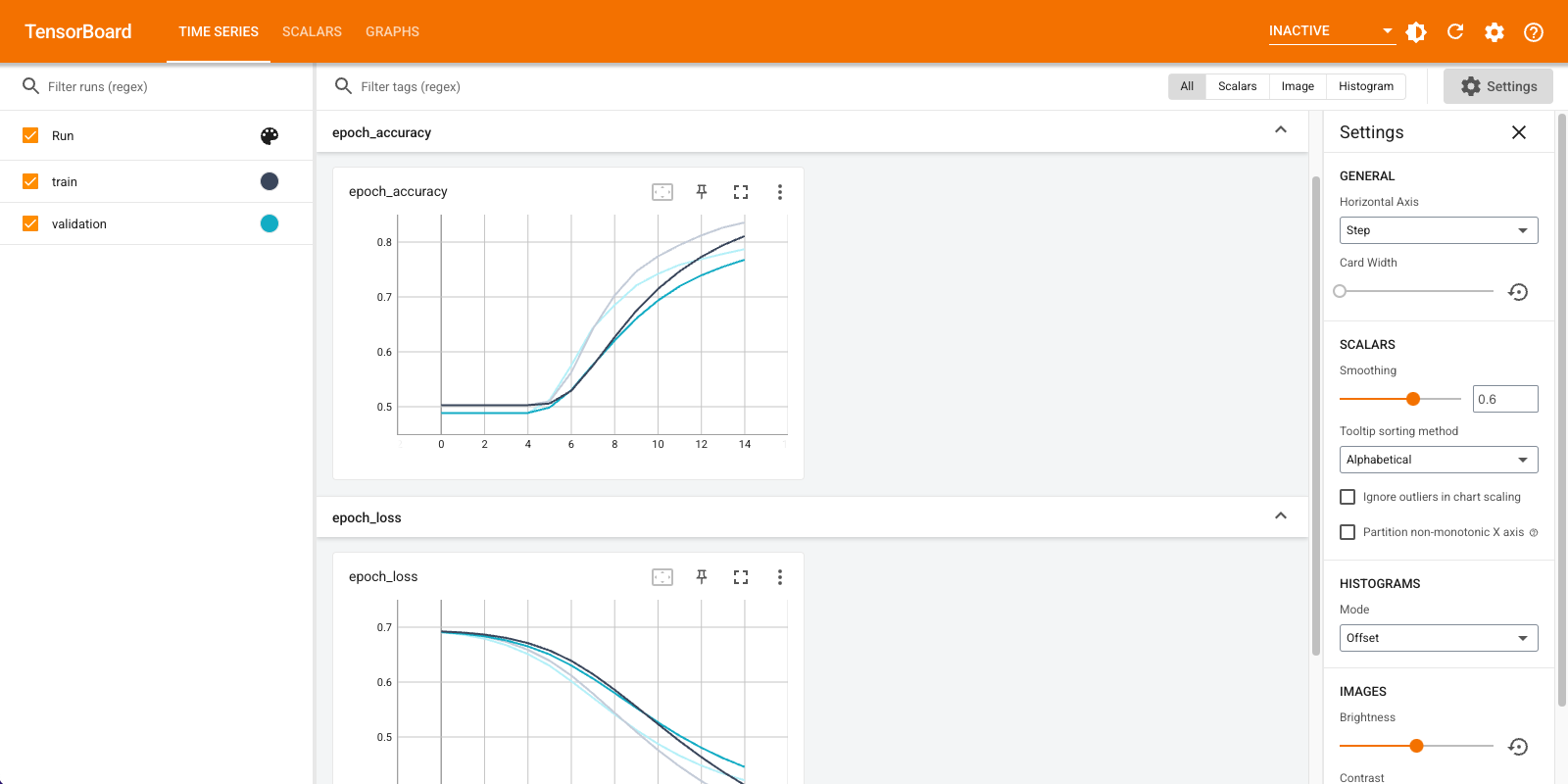
您将使用 TensorBoard 可视化包括损失和准确度在内的指标。创建一个 tf.keras.callbacks.TensorBoard。
tensorboard_callback = tf.keras.callbacks.TensorBoard(log_dir="logs")
使用 Adam 优化器和 BinaryCrossentropy 损失编译并训练模型。
model.compile(optimizer='adam',
              loss=tf.keras.losses.BinaryCrossentropy(from_logits=True),
              metrics=['accuracy'])
model.fit(
    train_ds,
    validation_data=val_ds,
    epochs=15,
    callbacks=[tensorboard_callback])
Epoch 1/15
WARNING: All log messages before absl::InitializeLog() is called are written to STDERR
I0000 00:00:1700143972.661462  113509 device_compiler.h:186] Compiled cluster using XLA!  This line is logged at most once for the lifetime of the process.
20/20 [==============================] - 6s 207ms/step - loss: 0.6923 - accuracy: 0.5028 - val_loss: 0.6908 - val_accuracy: 0.4886
Epoch 2/15
20/20 [==============================] - 1s 53ms/step - loss: 0.6887 - accuracy: 0.5028 - val_loss: 0.6857 - val_accuracy: 0.4886
Epoch 3/15
20/20 [==============================] - 1s 52ms/step - loss: 0.6818 - accuracy: 0.5028 - val_loss: 0.6768 - val_accuracy: 0.4886
Epoch 4/15
20/20 [==============================] - 1s 54ms/step - loss: 0.6705 - accuracy: 0.5028 - val_loss: 0.6629 - val_accuracy: 0.4886
Epoch 5/15
20/20 [==============================] - 1s 54ms/step - loss: 0.6532 - accuracy: 0.5042 - val_loss: 0.6437 - val_accuracy: 0.4966
Epoch 6/15
20/20 [==============================] - 1s 52ms/step - loss: 0.6300 - accuracy: 0.5397 - val_loss: 0.6198 - val_accuracy: 0.5548
Epoch 7/15
20/20 [==============================] - 1s 53ms/step - loss: 0.6017 - accuracy: 0.6126 - val_loss: 0.5924 - val_accuracy: 0.6236
Epoch 8/15
20/20 [==============================] - 1s 52ms/step - loss: 0.5694 - accuracy: 0.6849 - val_loss: 0.5628 - val_accuracy: 0.6708
Epoch 9/15
20/20 [==============================] - 1s 53ms/step - loss: 0.5348 - accuracy: 0.7330 - val_loss: 0.5331 - val_accuracy: 0.7104
Epoch 10/15
20/20 [==============================] - 1s 54ms/step - loss: 0.5005 - accuracy: 0.7652 - val_loss: 0.5055 - val_accuracy: 0.7344
Epoch 11/15
20/20 [==============================] - 1s 52ms/step - loss: 0.4684 - accuracy: 0.7876 - val_loss: 0.4812 - val_accuracy: 0.7518
Epoch 12/15
20/20 [==============================] - 1s 52ms/step - loss: 0.4394 - accuracy: 0.8056 - val_loss: 0.4606 - val_accuracy: 0.7648
Epoch 13/15
20/20 [==============================] - 1s 53ms/step - loss: 0.4137 - accuracy: 0.8195 - val_loss: 0.4435 - val_accuracy: 0.7748
Epoch 14/15
20/20 [==============================] - 1s 52ms/step - loss: 0.3912 - accuracy: 0.8308 - val_loss: 0.4293 - val_accuracy: 0.7846
Epoch 15/15
20/20 [==============================] - 1s 52ms/step - loss: 0.3714 - accuracy: 0.8409 - val_loss: 0.4178 - val_accuracy: 0.7896
<keras.src.callbacks.History at 0x7f90491be280>
使用此方法,模型达到约 78% 的验证准确度(请注意,由于训练准确度较高,因此模型出现了过拟合)。
您可以查看模型摘要以了解有关模型的每一层的更多信息。
model.summary()
Model: "sequential"
_________________________________________________________________
 Layer (type)                Output Shape              Param #
=================================================================
 text_vectorization (TextVe  (None, 100)               0
 ctorization)

 embedding (Embedding)       (None, 100, 16)           160000

 global_average_pooling1d (  (None, 16)                0
 GlobalAveragePooling1D)

 dense (Dense)               (None, 16)                272

 dense_1 (Dense)             (None, 1)                 17

=================================================================
Total params: 160289 (626.13 KB)
Trainable params: 160289 (626.13 KB)
Non-trainable params: 0 (0.00 Byte)
_________________________________________________________________
在 TensorBoard 中可视化模型指标。
#docs_infra: no_execute
%load_ext tensorboard
%tensorboard --logdir logs
检索经过训练的单词嵌入并将其保存到磁盘
接下来,检索在训练期间学习的单词嵌入。嵌入是模型中嵌入层的权重。权重矩阵的形状为 (vocab_size, embedding_dimension)。
使用 get_layer() 和 get_weights() 从模型中获取权重。get_vocabulary() 函数提供词汇表,以便构建每个单词一行元数据文件。
weights = model.get_layer('embedding').get_weights()[0]
vocab = vectorize_layer.get_vocabulary()
将权重写入磁盘。要使用 嵌入投影仪,您将以制表符分隔格式上传两个文件:一个向量文件(包含嵌入),一个元数据文件(包含单词)。
out_v = io.open('vectors.tsv', 'w', encoding='utf-8')
out_m = io.open('metadata.tsv', 'w', encoding='utf-8')

for index, word in enumerate(vocab):
  if index == 0:
    continue  # skip 0, it's padding.
  vec = weights[index]
  out_v.write('\t'.join([str(x) for x in vec]) + "\n")
  out_m.write(word + "\n")
out_v.close()
out_m.close()
如果您在 Colaboratory 中运行本教程,则可以使用以下代码段将这些文件下载到您的本地计算机(或使用文件浏览器,查看 -> 目录 -> 文件浏览器)。
try:
  from google.colab import files
  files.download('vectors.tsv')
  files.download('metadata.tsv')
except Exception:
  pass
可视化嵌入
要可视化嵌入,请将其上传到嵌入投影仪。
打开 嵌入投影仪(也可以在本地 TensorBoard 实例中运行)。
点击“加载数据”。
上传您上面创建的两个文件:
vecs.tsv和meta.tsv。
您训练的嵌入现在将显示出来。您可以搜索单词以找到它们的最近邻。例如,尝试搜索“beautiful”。您可能会看到“wonderful”之类的邻居。
下一步
本教程向您展示了如何在小型数据集上从头开始训练和可视化词嵌入。
要使用 Word2Vec 算法训练词嵌入,请尝试 Word2Vec 教程。
要了解有关高级文本处理的更多信息,请阅读 用于语言理解的 Transformer 模型。