
 在 TensorFlow.org 上查看 在 TensorFlow.org 上查看
|
 在 Google Colab 中运行 在 Google Colab 中运行
|
 在 GitHub 上查看源代码 在 GitHub 上查看源代码
|
 下载笔记本 下载笔记本
|
 查看 TF Hub 模型 查看 TF Hub 模型
|
本教程演示了如何使用 来自 Transformer 的双向编码器表示 (BERT) (Devlin 等人,2018) 模型使用 TensorFlow 模型花园 进行微调。
您还可以在 TensorFlow Hub (TF Hub) 上找到本教程中使用的预训练 BERT 模型。有关如何使用 TF Hub 中模型的具体示例,请参阅 使用 BERT 解决 Glue 任务 教程。如果您只是想微调模型,TF Hub 教程是一个不错的起点。
另一方面,如果您有兴趣进行更深入的自定义,请遵循本教程。它展示了如何手动执行许多操作,因此您可以学习如何从数据预处理到训练、导出和保存模型自定义工作流程。
设置
安装 pip 包
首先安装 TensorFlow Text 和 Model Garden pip 包。
tf-models-official是 TensorFlow 模型花园包。请注意,它可能不包含tensorflow_modelsGitHub 存储库中的最新更改。要包含最新更改,您可以安装tf-models-nightly,它是每天自动创建的夜间模型花园包。- pip 将自动安装所有模型和依赖项。
pip install -q opencv-python
pip install -q -U "tensorflow-text==2.11.*"
pip install -q tf-models-official
导入库
import os

import numpy as np
import matplotlib.pyplot as plt

import tensorflow as tf
import tensorflow_models as tfm
import tensorflow_hub as hub
import tensorflow_datasets as tfds
tfds.disable_progress_bar()
2024-02-07 12:13:37.890233: E external/local_xla/xla/stream_executor/cuda/cuda_dnn.cc:9261] Unable to register cuDNN factory: Attempting to register factory for plugin cuDNN when one has already been registered
2024-02-07 12:13:37.890282: E external/local_xla/xla/stream_executor/cuda/cuda_fft.cc:607] Unable to register cuFFT factory: Attempting to register factory for plugin cuFFT when one has already been registered
2024-02-07 12:13:37.891884: E external/local_xla/xla/stream_executor/cuda/cuda_blas.cc:1515] Unable to register cuBLAS factory: Attempting to register factory for plugin cuBLAS when one has already been registered
资源
以下目录包含 BERT 模型的配置、词汇表和本教程中使用的预训练检查点
gs_folder_bert = "gs://cloud-tpu-checkpoints/bert/v3/uncased_L-12_H-768_A-12"
tf.io.gfile.listdir(gs_folder_bert)
['bert_config.json',
 'bert_model.ckpt.data-00000-of-00001',
 'bert_model.ckpt.index',
 'vocab.txt']
加载和预处理数据集
本示例使用 GLUE (通用语言理解评估) MRPC (微软研究院释义语料库) 来自 TensorFlow 数据集 (TFDS) 的数据集。
此数据集的设置方式并非可以直接馈送到 BERT 模型中。以下部分将处理必要的预处理。
从 TensorFlow 数据集获取数据集
GLUE MRPC (Dolan 和 Brockett,2005) 数据集是一个从在线新闻来源自动提取的句子对语料库,包含人类对句子对是否在语义上等效的标注。它具有以下属性
- 标签数量:2
- 训练数据集大小:3668
- 评估数据集大小:408
- 训练和评估数据集的最大序列长度:128
首先从 TFDS 加载 MRPC 数据集
batch_size=32
glue, info = tfds.load('glue/mrpc',
                       with_info=True,
                       batch_size=32)
glue
{'train': <_PrefetchDataset element_spec={'idx': TensorSpec(shape=(None,), dtype=tf.int32, name=None), 'label': TensorSpec(shape=(None,), dtype=tf.int64, name=None), 'sentence1': TensorSpec(shape=(None,), dtype=tf.string, name=None), 'sentence2': TensorSpec(shape=(None,), dtype=tf.string, name=None)}>,
 'validation': <_PrefetchDataset element_spec={'idx': TensorSpec(shape=(None,), dtype=tf.int32, name=None), 'label': TensorSpec(shape=(None,), dtype=tf.int64, name=None), 'sentence1': TensorSpec(shape=(None,), dtype=tf.string, name=None), 'sentence2': TensorSpec(shape=(None,), dtype=tf.string, name=None)}>,
 'test': <_PrefetchDataset element_spec={'idx': TensorSpec(shape=(None,), dtype=tf.int32, name=None), 'label': TensorSpec(shape=(None,), dtype=tf.int64, name=None), 'sentence1': TensorSpec(shape=(None,), dtype=tf.string, name=None), 'sentence2': TensorSpec(shape=(None,), dtype=tf.string, name=None)}>}
info 对象描述了数据集及其特征
info.features
FeaturesDict({
    'idx': int32,
    'label': ClassLabel(shape=(), dtype=int64, num_classes=2),
    'sentence1': Text(shape=(), dtype=string),
    'sentence2': Text(shape=(), dtype=string),
})
这两个类是
info.features['label'].names
['not_equivalent', 'equivalent']
以下是一个来自训练集的示例
example_batch = next(iter(glue['train']))

for key, value in example_batch.items():
  print(f"{key:9s}: {value[0].numpy()}")
idx      : 1680
label    : 0
sentence1: b'The identical rovers will act as robotic geologists , searching for evidence of past water .'
sentence2: b'The rovers act as robotic geologists , moving on six wheels .'
2024-02-07 12:13:45.153482: W tensorflow/core/kernels/data/cache_dataset_ops.cc:858] The calling iterator did not fully read the dataset being cached. In order to avoid unexpected truncation of the dataset, the partially cached contents of the dataset  will be discarded. This can happen if you have an input pipeline similar to `dataset.cache().take(k).repeat()`. You should use `dataset.take(k).cache().repeat()` instead.
预处理数据
GLUE MRPC 数据集中 "sentence1" 和 "sentence2" 键包含每个示例的两个输入句子。
由于模型花园中的 BERT 模型不接受原始文本作为输入,因此首先需要做两件事
- 文本需要进行分词(拆分为词片)并转换为索引。
- 然后,需要将索引打包成模型期望的格式。
BERT 分词器
要微调模型花园中的预训练语言模型(如 BERT),您需要确保您使用与训练期间使用的完全相同的标记化、词汇表和索引映射。
以下代码使用模型花园的 tfm.nlp.layers.FastWordpieceBertTokenizer 层重建了基础模型使用的分词器
tokenizer = tfm.nlp.layers.FastWordpieceBertTokenizer(
    vocab_file=os.path.join(gs_folder_bert, "vocab.txt"),
    lower_case=True)
让我们对一个测试句子进行分词
tokens = tokenizer(tf.constant(["Hello TensorFlow!"]))
tokens
<tf.RaggedTensor [[[7592], [23435, 12314], [999]]]>
在 子词标记化 和 使用 TensorFlow Text 进行标记化 指南中了解有关标记化过程的更多信息。
打包输入
TensorFlow 模型花园的 BERT 模型不只是接受标记化的字符串作为输入。它还期望这些字符串打包成特定的格式。 tfm.nlp.layers.BertPackInputs 层可以处理从标记化句子列表到模型花园的 BERT 模型期望的输入格式的转换。
tfm.nlp.layers.BertPackInputs 将两个输入句子(MRCP 数据集中每个示例的两个句子)连接在一起进行打包。此输入预计以 [CLS] “这是一个分类问题” 标记开头,每个句子都应以 [SEP] “分隔符” 标记结尾。
因此,tfm.nlp.layers.BertPackInputs 层的构造函数将 tokenizer 的特殊标记作为参数。它还需要知道分词器特殊标记的索引。
special = tokenizer.get_special_tokens_dict()
special
{'vocab_size': 30522,
 'start_of_sequence_id': 101,
 'end_of_segment_id': 102,
 'padding_id': 0,
 'mask_id': 103}
max_seq_length = 128

packer = tfm.nlp.layers.BertPackInputs(
    seq_length=max_seq_length,
    special_tokens_dict = tokenizer.get_special_tokens_dict())
packer 接受标记化句子列表作为输入。例如
sentences1 = ["hello tensorflow"]
tok1 = tokenizer(sentences1)
tok1
<tf.RaggedTensor [[[7592], [23435, 12314]]]>
sentences2 = ["goodbye tensorflow"]
tok2 = tokenizer(sentences2)
tok2
<tf.RaggedTensor [[[9119], [23435, 12314]]]>
然后,它返回一个包含三个输出的字典
input_word_ids:打包在一起的标记化句子。input_mask:指示其他输出中哪些位置有效的掩码。input_type_ids:指示每个标记属于哪个句子。
packed = packer([tok1, tok2])

for key, tensor in packed.items():
  print(f"{key:15s}: {tensor[:, :12]}")
input_word_ids : [[  101  7592 23435 12314   102  9119 23435 12314   102     0     0     0]]
input_mask     : [[1 1 1 1 1 1 1 1 1 0 0 0]]
input_type_ids : [[0 0 0 0 0 1 1 1 1 0 0 0]]
将所有内容整合在一起
将这两个部分组合成一个 keras.layers.Layer,该层可以附加到您的模型
class BertInputProcessor(tf.keras.layers.Layer):
  def __init__(self, tokenizer, packer):
    super().__init__()
    self.tokenizer = tokenizer
    self.packer = packer

  def call(self, inputs):
    tok1 = self.tokenizer(inputs['sentence1'])
    tok2 = self.tokenizer(inputs['sentence2'])

    packed = self.packer([tok1, tok2])

    if 'label' in inputs:
      return packed, inputs['label']
    else:
      return packed
但现在,只需使用 Dataset.map 将其应用于数据集,因为您从 TFDS 加载的数据集是一个 tf.data.Dataset 对象。
bert_inputs_processor = BertInputProcessor(tokenizer, packer)
glue_train = glue['train'].map(bert_inputs_processor).prefetch(1)
这是一个来自处理后数据集的示例批次。
example_inputs, example_labels = next(iter(glue_train))
2024-02-07 12:13:49.744645: W tensorflow/core/kernels/data/cache_dataset_ops.cc:858] The calling iterator did not fully read the dataset being cached. In order to avoid unexpected truncation of the dataset, the partially cached contents of the dataset will be discarded. This can happen if you have an input pipeline similar to `dataset.cache().take(k).repeat()`. You should use `dataset.take(k).cache().repeat()` instead.
example_inputs
{'input_word_ids': <tf.Tensor: shape=(32, 128), dtype=int32, numpy=
 array([[ 101, 1996, 7235, ...,    0,    0,    0],
        [ 101, 2625, 2084, ...,    0,    0,    0],
        [ 101, 6804, 1011, ...,    0,    0,    0],
        ...,
        [ 101, 2021, 2049, ...,    0,    0,    0],
        [ 101, 2274, 2062, ...,    0,    0,    0],
        [ 101, 2043, 1037, ...,    0,    0,    0]], dtype=int32)>,
 'input_mask': <tf.Tensor: shape=(32, 128), dtype=int32, numpy=
 array([[1, 1, 1, ..., 0, 0, 0],
        [1, 1, 1, ..., 0, 0, 0],
        [1, 1, 1, ..., 0, 0, 0],
        ...,
        [1, 1, 1, ..., 0, 0, 0],
        [1, 1, 1, ..., 0, 0, 0],
        [1, 1, 1, ..., 0, 0, 0]], dtype=int32)>,
 'input_type_ids': <tf.Tensor: shape=(32, 128), dtype=int32, numpy=
 array([[0, 0, 0, ..., 0, 0, 0],
        [0, 0, 0, ..., 0, 0, 0],
        [0, 0, 0, ..., 0, 0, 0],
        ...,
        [0, 0, 0, ..., 0, 0, 0],
        [0, 0, 0, ..., 0, 0, 0],
        [0, 0, 0, ..., 0, 0, 0]], dtype=int32)>}
example_labels
<tf.Tensor: shape=(32,), dtype=int64, numpy=
array([0, 0, 1, 1, 0, 0, 1, 1, 1, 1, 1, 1, 0, 1, 1, 0, 1, 1, 1, 0, 1, 1,
       1, 1, 1, 1, 1, 0, 0, 1, 0, 1])>
for key, value in example_inputs.items():
  print(f'{key:15s} shape: {value.shape}')

print(f'{"labels":15s} shape: {example_labels.shape}')
input_word_ids  shape: (32, 128)
input_mask      shape: (32, 128)
input_type_ids  shape: (32, 128)
labels          shape: (32,)
input_word_ids 包含标记 ID。
plt.pcolormesh(example_inputs['input_word_ids'])
<matplotlib.collections.QuadMesh at 0x7f0f10480250>
掩码允许模型清晰地区分内容和填充。掩码与 input_word_ids 形状相同,并且在 input_word_ids 不是填充的任何地方都包含一个 1。
plt.pcolormesh(example_inputs['input_mask'])
<matplotlib.collections.QuadMesh at 0x7f0f500ce670>
"输入类型" 也具有相同的形状,但在非填充区域内,包含一个 0 或一个 1,指示标记属于哪个句子。
plt.pcolormesh(example_inputs['input_type_ids'])
<matplotlib.collections.QuadMesh at 0x7f0f201d4700>
将相同的预处理应用于 GLUE MRPC 数据集的验证和测试子集。
glue_validation = glue['validation'].map(bert_inputs_processor).prefetch(1)
glue_test = glue['test'].map(bert_inputs_processor).prefetch(1)
构建、训练和导出模型。
现在您已经按照预期格式化了数据,您可以开始构建和训练模型。
构建模型。
第一步是下载预训练 BERT 模型的配置文件 - config_dict。
import json

bert_config_file = os.path.join(gs_folder_bert, "bert_config.json")
config_dict = json.loads(tf.io.gfile.GFile(bert_config_file).read())
config_dict
{'attention_probs_dropout_prob': 0.1,
 'hidden_act': 'gelu',
 'hidden_dropout_prob': 0.1,
 'hidden_size': 768,
 'initializer_range': 0.02,
 'intermediate_size': 3072,
 'max_position_embeddings': 512,
 'num_attention_heads': 12,
 'num_hidden_layers': 12,
 'type_vocab_size': 2,
 'vocab_size': 30522}
encoder_config = tfm.nlp.encoders.EncoderConfig({
    'type':'bert',
    'bert': config_dict
})
bert_encoder = tfm.nlp.encoders.build_encoder(encoder_config)
bert_encoder
<official.nlp.modeling.networks.bert_encoder.BertEncoder at 0x7f0f103d16d0>
配置文件定义了 Model Garden 中的核心 BERT 模型,这是一个 Keras 模型,它从具有最大序列长度 max_seq_length 的输入中预测 num_classes 的输出。
bert_classifier = tfm.nlp.models.BertClassifier(network=bert_encoder, num_classes=2)
在来自训练集的 10 个示例的测试数据批次上运行它。输出是两个类的 logits。
bert_classifier(
    example_inputs, training=True).numpy()[:10]
array([[ 0.08335936,  1.1473498 ],
       [ 1.3190541 ,  1.3408866 ],
       [ 0.19908446,  0.7913456 ],
       [ 0.48186374,  1.2114024 ],
       [ 0.9708527 ,  0.7837988 ],
       [ 0.25541633,  0.76591694],
       [ 1.3683597 ,  1.0795705 ],
       [ 0.11288509,  1.1301354 ],
       [-0.02536219,  0.4678782 ],
       [ 0.9831672 ,  0.538211  ]], dtype=float32)
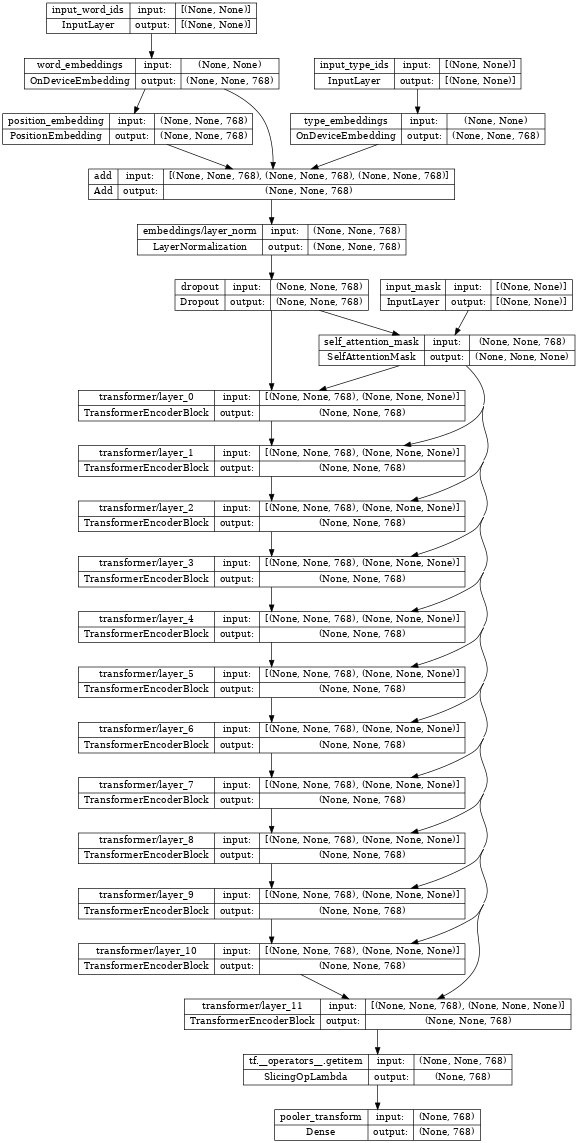
上面的分类器中心的 TransformerEncoder **就是** bert_encoder。
如果您检查编码器,请注意连接到这三个相同输入的 Transformer 层堆栈。
tf.keras.utils.plot_model(bert_encoder, show_shapes=True, dpi=48)
恢复编码器权重。
构建后,编码器将被随机初始化。从检查点恢复编码器的权重。
checkpoint = tf.train.Checkpoint(encoder=bert_encoder)
checkpoint.read(
    os.path.join(gs_folder_bert, 'bert_model.ckpt')).assert_consumed()
<tensorflow.python.checkpoint.checkpoint.CheckpointLoadStatus at 0x7f105f713cd0>
设置优化器。
BERT 通常使用带权重衰减的 Adam 优化器 - AdamW (tf.keras.optimizers.experimental.AdamW)。它还采用了一个学习率计划,该计划首先从 0 开始预热,然后衰减到 0。
# Set up epochs and steps
epochs = 5
batch_size = 32
eval_batch_size = 32

train_data_size = info.splits['train'].num_examples
steps_per_epoch = int(train_data_size / batch_size)
num_train_steps = steps_per_epoch * epochs
warmup_steps = int(0.1 * num_train_steps)
initial_learning_rate=2e-5
从 initial_learning_rate 线性衰减到零,跨越 num_train_steps。
linear_decay = tf.keras.optimizers.schedules.PolynomialDecay(
    initial_learning_rate=initial_learning_rate,
    end_learning_rate=0,
    decay_steps=num_train_steps)
在 warmup_steps 内预热到该值。
warmup_schedule = tfm.optimization.lr_schedule.LinearWarmup(
    warmup_learning_rate = 0,
    after_warmup_lr_sched = linear_decay,
    warmup_steps = warmup_steps
)
总体计划如下所示。
x = tf.linspace(0, num_train_steps, 1001)
y = [warmup_schedule(xi) for xi in x]
plt.plot(x,y)
plt.xlabel('Train step')
plt.ylabel('Learning rate')
Text(0, 0.5, 'Learning rate')
使用 tf.keras.optimizers.experimental.AdamW 使用该计划实例化优化器。
optimizer = tf.keras.optimizers.experimental.Adam(
    learning_rate = warmup_schedule)
训练模型。
将指标设置为准确率,将损失设置为稀疏分类交叉熵。然后,编译并训练 BERT 分类器。
metrics = [tf.keras.metrics.SparseCategoricalAccuracy('accuracy', dtype=tf.float32)]
loss = tf.keras.losses.SparseCategoricalCrossentropy(from_logits=True)

bert_classifier.compile(
    optimizer=optimizer,
    loss=loss,
    metrics=metrics)
bert_classifier.evaluate(glue_validation)
13/13 [==============================] - 6s 255ms/step - loss: 1.1962 - accuracy: 0.3162
[1.1962156295776367, 0.31617647409439087]
bert_classifier.fit(
      glue_train,
      validation_data=(glue_validation),
      batch_size=32,
      epochs=epochs)
Epoch 1/5
WARNING: All log messages before absl::InitializeLog() is called are written to STDERR
I0000 00:00:1707308071.926522   10692 device_compiler.h:186] Compiled cluster using XLA!  This line is logged at most once for the lifetime of the process.
115/115 [==============================] - 131s 858ms/step - loss: 0.7210 - accuracy: 0.6191 - val_loss: 0.5249 - val_accuracy: 0.7426
Epoch 2/5
115/115 [==============================] - 101s 875ms/step - loss: 0.4744 - accuracy: 0.7751 - val_loss: 0.4766 - val_accuracy: 0.8064
Epoch 3/5
115/115 [==============================] - 101s 877ms/step - loss: 0.3204 - accuracy: 0.8642 - val_loss: 0.4100 - val_accuracy: 0.8333
Epoch 4/5
115/115 [==============================] - 101s 878ms/step - loss: 0.2006 - accuracy: 0.9278 - val_loss: 0.4783 - val_accuracy: 0.8358
Epoch 5/5
115/115 [==============================] - 101s 879ms/step - loss: 0.1323 - accuracy: 0.9577 - val_loss: 0.4668 - val_accuracy: 0.8382
<keras.src.callbacks.History at 0x7f105f702250>
现在在自定义示例上运行微调后的模型,以查看它是否有效。
首先对一些句子对进行编码。
my_examples = {
        'sentence1':[
            'The rain in Spain falls mainly on the plain.',
            'Look I fine tuned BERT.'],
        'sentence2':[
            'It mostly rains on the flat lands of Spain.',
            'Is it working? This does not match.']
    }
模型应该为第一个示例报告类别 1 "匹配",为第二个示例报告类别 0 "不匹配"。
ex_packed = bert_inputs_processor(my_examples)
my_logits = bert_classifier(ex_packed, training=False)

result_cls_ids = tf.argmax(my_logits)
result_cls_ids
<tf.Tensor: shape=(2,), dtype=int64, numpy=array([1, 0])>
tf.gather(tf.constant(info.features['label'].names), result_cls_ids)
<tf.Tensor: shape=(2,), dtype=string, numpy=array([b'equivalent', b'not_equivalent'], dtype=object)>
导出模型。
训练模型的目标通常是使用它来执行创建它的 Python 进程之外的某些操作。您可以使用 tf.saved_model 导出模型来实现这一点。(在 使用 SavedModel 格式 指南和 使用分布式策略保存和加载模型 教程中了解更多信息。)
首先,构建一个包装类来导出模型。此包装器执行两件事。
- 首先,它将
bert_inputs_processor和bert_classifier打包到一个tf.Module中,以便您可以导出所有功能。 - 其次,它定义了一个
tf.function,它实现了模型的端到端执行。
设置 tf.function 的 input_signature 参数允许您为 tf.function 定义一个固定签名。这可能比默认的自动重新跟踪行为更不令人惊讶。
class ExportModel(tf.Module):
  def __init__(self, input_processor, classifier):
    self.input_processor = input_processor
    self.classifier = classifier

  @tf.function(input_signature=[{
      'sentence1': tf.TensorSpec(shape=[None], dtype=tf.string),
      'sentence2': tf.TensorSpec(shape=[None], dtype=tf.string)}])
  def __call__(self, inputs):
    packed = self.input_processor(inputs)
    logits =  self.classifier(packed, training=False)
    result_cls_ids = tf.argmax(logits)
    return {
        'logits': logits,
        'class_id': result_cls_ids,
        'class': tf.gather(
            tf.constant(info.features['label'].names),
            result_cls_ids)
    }
创建此导出模型的实例并保存它。
export_model = ExportModel(bert_inputs_processor, bert_classifier)
import tempfile
export_dir=tempfile.mkdtemp(suffix='_saved_model')
tf.saved_model.save(export_model, export_dir=export_dir,
                    signatures={'serving_default': export_model.__call__})
INFO:tensorflow:Assets written to: /tmpfs/tmp/tmpxj846i17_saved_model/assets
INFO:tensorflow:Assets written to: /tmpfs/tmp/tmpxj846i17_saved_model/assets
重新加载模型并将结果与原始结果进行比较。
original_logits = export_model(my_examples)['logits']
reloaded = tf.saved_model.load(export_dir)
reloaded_logits = reloaded(my_examples)['logits']
# The results are identical:
print(original_logits.numpy())
print()
print(reloaded_logits.numpy())
[[-2.7769644  2.3126464]
 [ 1.4339567 -1.1664971]]

[[-2.7769644  2.3126464]
 [ 1.4339567 -1.1664971]]
print(np.mean(abs(original_logits - reloaded_logits)))
0.0
恭喜!您已使用 tensorflow_models 构建 BERT 分类器、训练它并将其导出以供日后使用。
可选:TF Hub 上的 BERT
您可以从 TF Hub 获取现成的 BERT 模型。有 许多版本以及它们的输入预处理器可用。
此示例使用 来自 TF Hub 的 BERT 的小型版本,该版本使用英语维基百科和 BooksCorpus 数据集进行预训练,类似于 原始实现(Turc 等人,2019 年)。
首先导入 TF Hub。
import tensorflow_hub as hub
从 TF Hub 选择输入预处理器和模型,并将它们包装为 hub.KerasLayer 层。
# Always make sure you use the right preprocessor.
hub_preprocessor = hub.KerasLayer(
    "https://tfhub.dev/tensorflow/bert_en_uncased_preprocess/3")

# This is a really small BERT.
hub_encoder = hub.KerasLayer(f"https://tfhub.dev/tensorflow/small_bert/bert_en_uncased_L-2_H-128_A-2/2",
                             trainable=True)

print(f"The Hub encoder has {len(hub_encoder.trainable_variables)} trainable variables")
The Hub encoder has 39 trainable variables
在数据批次上测试运行预处理器。
hub_inputs = hub_preprocessor(['Hello TensorFlow!'])
{key: value[0, :10].numpy() for key, value in hub_inputs.items()}
{'input_type_ids': array([0, 0, 0, 0, 0, 0, 0, 0, 0, 0], dtype=int32),
 'input_word_ids': array([  101,  7592, 23435, 12314,   999,   102,     0,     0,     0,
            0], dtype=int32),
 'input_mask': array([1, 1, 1, 1, 1, 1, 0, 0, 0, 0], dtype=int32)}
result = hub_encoder(
    inputs=hub_inputs,
    training=False,
)

print("Pooled output shape:", result['pooled_output'].shape)
print("Sequence output shape:", result['sequence_output'].shape)
Pooled output shape: (1, 128)
Sequence output shape: (1, 128, 128)
此时,自己添加分类头将很简单。
Model Garden tfm.nlp.models.BertClassifier 类也可以在 TF Hub 编码器上构建分类器。
hub_classifier = tfm.nlp.models.BertClassifier(
    bert_encoder,
    num_classes=2,
    dropout_rate=0.1,
    initializer=tf.keras.initializers.TruncatedNormal(
        stddev=0.02))
从 TF Hub 加载此模型的一个缺点是,内部 Keras 层的结构没有恢复。这使得检查或修改模型更加困难。
BERT 编码器模型 - hub_classifier - 现在是一个单层。
有关此方法的具体示例,请参阅 使用 BERT 解决 Glue 任务。
可选:优化器 config
tensorflow_models 包定义了可序列化的 config 类,这些类描述了如何构建实时对象。在本教程的前面,您手动构建了优化器。
下面的配置描述了由 optimizer_factory.OptimizerFactory 构建的(几乎)相同的优化器。
optimization_config = tfm.optimization.OptimizationConfig(
    optimizer=tfm.optimization.OptimizerConfig(
        type = "adam"),
    learning_rate = tfm.optimization.LrConfig(
        type='polynomial',
        polynomial=tfm.optimization.PolynomialLrConfig(
            initial_learning_rate=2e-5,
            end_learning_rate=0.0,
            decay_steps=num_train_steps)),
    warmup = tfm.optimization.WarmupConfig(
        type='linear',
        linear=tfm.optimization.LinearWarmupConfig(warmup_steps=warmup_steps)
    ))


fac = tfm.optimization.optimizer_factory.OptimizerFactory(optimization_config)
lr = fac.build_learning_rate()
optimizer = fac.build_optimizer(lr=lr)
x = tf.linspace(0, num_train_steps, 1001).numpy()
y = [lr(xi) for xi in x]
plt.plot(x,y)
plt.xlabel('Train step')
plt.ylabel('Learning rate')
Text(0, 0.5, 'Learning rate')
使用 config 对象的优势在于它们不包含任何复杂的 TensorFlow 对象,并且可以轻松地序列化为 JSON 并重建。以下是上面 tfm.optimization.OptimizationConfig 的 JSON。
optimization_config = optimization_config.as_dict()
optimization_config
{'optimizer': {'type': 'adam',
  'adam': {'clipnorm': None,
   'clipvalue': None,
   'global_clipnorm': None,
   'name': 'Adam',
   'beta_1': 0.9,
   'beta_2': 0.999,
   'epsilon': 1e-07,
   'amsgrad': False} },
 'ema': None,
 'learning_rate': {'type': 'polynomial',
  'polynomial': {'name': 'PolynomialDecay',
   'initial_learning_rate': 2e-05,
   'decay_steps': 570,
   'end_learning_rate': 0.0,
   'power': 1.0,
   'cycle': False,
   'offset': 0} },
 'warmup': {'type': 'linear',
  'linear': {'name': 'linear', 'warmup_learning_rate': 0, 'warmup_steps': 57} } }
tfm.optimization.optimizer_factory.OptimizerFactory 可以同样轻松地从 JSON 字典构建优化器。
fac = tfm.optimization.optimizer_factory.OptimizerFactory(
    tfm.optimization.OptimizationConfig(optimization_config))
lr = fac.build_learning_rate()
optimizer = fac.build_optimizer(lr=lr)