
 在 TensorFlow.org 上查看 在 TensorFlow.org 上查看
|
 在 Google Colab 中运行 在 Google Colab 中运行
|
 在 GitHub 上查看源代码 在 GitHub 上查看源代码
|
 下载笔记本 下载笔记本
|
简介
此笔记本使用 TensorFlow 核心低级 API 和 DTensor 演示数据并行分布式训练示例。访问 核心 API 概述 了解有关 TensorFlow 核心及其预期用例的更多信息。参考 DTensor 概述 指南和 使用 DTensor 进行分布式训练 教程,了解有关 DTensor 的更多信息。
此示例使用与 多层感知器 教程中显示的相同模型和优化器。首先查看此教程,以便熟悉使用核心 API 编写端到端机器学习工作流程。
使用 DTensor 进行数据并行训练的概述
在构建支持分布的 MLP 之前,花点时间探索 DTensor 用于数据并行训练的基础知识。
DTensor 允许您跨设备运行分布式训练,以提高效率、可靠性和可扩展性。DTensor 通过称为单程序多数据 (SPMD) 扩展的过程,根据分片指令分配程序和张量。DTensor 感知层的变量创建为 dtensor.DVariable,并且 DTensor 感知层对象的构造函数除了通常的层参数之外,还接受额外的 Layout 输入。
数据并行训练的主要思想如下
- 模型变量在每个 N 个设备上复制。
- 全局批次被分成 N 个每个副本批次。
- 每个每个副本批次都在副本设备上进行训练。
- 在所有副本上集体执行权重更新数据之前,会减少梯度。
- 数据并行训练在设备数量方面提供了近乎线性的速度提升。
设置
DTensor 是 TensorFlow 2.9.0 版本的一部分。
#!pip install --quiet --upgrade --pre tensorflow
import matplotlib
from matplotlib import pyplot as plt
# Preset Matplotlib figure sizes.
matplotlib.rcParams['figure.figsize'] = [9, 6]
import tensorflow as tf
import tensorflow_datasets as tfds
from tensorflow.experimental import dtensor
print(tf.__version__)
# Set random seed for reproducible results
tf.random.set_seed(22)
2023-10-04 01:30:56.221874: E tensorflow/compiler/xla/stream_executor/cuda/cuda_dnn.cc:9342] Unable to register cuDNN factory: Attempting to register factory for plugin cuDNN when one has already been registered
2023-10-04 01:30:56.221918: E tensorflow/compiler/xla/stream_executor/cuda/cuda_fft.cc:609] Unable to register cuFFT factory: Attempting to register factory for plugin cuFFT when one has already been registered
2023-10-04 01:30:56.221966: E tensorflow/compiler/xla/stream_executor/cuda/cuda_blas.cc:1518] Unable to register cuBLAS factory: Attempting to register factory for plugin cuBLAS when one has already been registered
2.14.0
为本实验配置 8 个虚拟 CPU。DTensor 也可以与 GPU 或 TPU 设备一起使用。鉴于此笔记本使用虚拟设备,分布式训练带来的加速并不明显。
def configure_virtual_cpus(ncpu):
  phy_devices = tf.config.list_physical_devices('CPU')
  tf.config.set_logical_device_configuration(phy_devices[0], [
        tf.config.LogicalDeviceConfiguration(),
    ] * ncpu)

configure_virtual_cpus(8)

DEVICES = [f'CPU:{i}' for i in range(8)]
devices = tf.config.list_logical_devices('CPU')
device_names = [d.name for d in devices]
device_names
2023-10-04 01:30:59.029163: W tensorflow/core/common_runtime/gpu/gpu_device.cc:2211] Cannot dlopen some GPU libraries. Please make sure the missing libraries mentioned above are installed properly if you would like to use GPU. Follow the guide at https://tensorflowcn.cn/install/gpu for how to download and setup the required libraries for your platform.
Skipping registering GPU devices...
['/device:CPU:0',
 '/device:CPU:1',
 '/device:CPU:2',
 '/device:CPU:3',
 '/device:CPU:4',
 '/device:CPU:5',
 '/device:CPU:6',
 '/device:CPU:7']
MNIST 数据集
该数据集可从 TensorFlow 数据集 获取。将数据分成训练集和测试集。为了节省时间,只使用 5000 个示例进行训练和测试。
train_data, test_data = tfds.load("mnist", split=['train[:5000]', 'test[:5000]'], batch_size=128, as_supervised=True)
预处理数据
通过将数据重塑为二维并将其重新缩放以适合单位区间 [0,1] 来预处理数据。
def preprocess(x, y):
  # Reshaping the data
  x = tf.reshape(x, shape=[-1, 784])
  # Rescaling the data
  x = x/255
  return x, y

train_data, test_data = train_data.map(preprocess), test_data.map(preprocess)
构建 MLP
使用 DTensor 感知层构建 MLP 模型。
密集层
首先创建一个支持 DTensor 的密集层模块。 dtensor.call_with_layout 函数可用于调用接收 DTensor 输入并生成 DTensor 输出的函数。这对于使用 TensorFlow 支持的函数初始化 DTensor 变量 dtensor.DVariable 很有用。
class DenseLayer(tf.Module):

  def __init__(self, in_dim, out_dim, weight_layout, activation=tf.identity):
    super().__init__()
    # Initialize dimensions and the activation function
    self.in_dim, self.out_dim = in_dim, out_dim
    self.activation = activation

    # Initialize the DTensor weights using the Xavier scheme
    uniform_initializer = tf.function(tf.random.stateless_uniform)
    xavier_lim = tf.sqrt(6.)/tf.sqrt(tf.cast(self.in_dim + self.out_dim, tf.float32))
    self.w = dtensor.DVariable(
      dtensor.call_with_layout(
          uniform_initializer, weight_layout,
          shape=(self.in_dim, self.out_dim), seed=(22, 23),
          minval=-xavier_lim, maxval=xavier_lim))

    # Initialize the bias with the zeros
    bias_layout = weight_layout.delete([0])
    self.b = dtensor.DVariable(
      dtensor.call_with_layout(tf.zeros, bias_layout, shape=[out_dim]))

  def __call__(self, x):
    # Compute the forward pass
    z = tf.add(tf.matmul(x, self.w), self.b)
    return self.activation(z)
MLP 顺序模型
现在创建一个按顺序执行密集层的 MLP 模块。
class MLP(tf.Module):

  def __init__(self, layers):
    self.layers = layers

  def __call__(self, x, preds=False):
    # Execute the model's layers sequentially
    for layer in self.layers:
      x = layer(x)
    return x
使用 DTensor 执行“数据并行”训练等同于 tf.distribute.MirroredStrategy。为此,每个设备将在数据批次的分片上运行相同的模型。因此,您需要以下内容
- 具有单个
"batch"维度的dtensor.Mesh - 所有权重的
dtensor.Layout,在网格上复制它们(对每个轴使用dtensor.UNSHARDED) - 将批次维度跨网格拆分的数据的
dtensor.Layout
创建一个 DTensor 网格,该网格包含单个批次维度,其中每个设备都成为一个副本,接收来自全局批次的分片。使用此网格使用以下架构实例化 MLP 模式
前向传递:ReLU(784 x 700) x ReLU(700 x 500) x Softmax(500 x 10)
mesh = dtensor.create_mesh([("batch", 8)], devices=DEVICES)
weight_layout = dtensor.Layout([dtensor.UNSHARDED, dtensor.UNSHARDED], mesh)

input_size = 784
hidden_layer_1_size = 700
hidden_layer_2_size = 500
hidden_layer_2_size = 10

mlp_model = MLP([
    DenseLayer(in_dim=input_size, out_dim=hidden_layer_1_size,
               weight_layout=weight_layout,
               activation=tf.nn.relu),
    DenseLayer(in_dim=hidden_layer_1_size , out_dim=hidden_layer_2_size,
               weight_layout=weight_layout,
               activation=tf.nn.relu),
    DenseLayer(in_dim=hidden_layer_2_size, out_dim=hidden_layer_2_size,
               weight_layout=weight_layout)])
训练指标
使用交叉熵损失函数和准确率指标进行训练。
def cross_entropy_loss(y_pred, y):
  # Compute cross entropy loss with a sparse operation
  sparse_ce = tf.nn.sparse_softmax_cross_entropy_with_logits(labels=y, logits=y_pred)
  return tf.reduce_mean(sparse_ce)

def accuracy(y_pred, y):
  # Compute accuracy after extracting class predictions
  class_preds = tf.argmax(y_pred, axis=1)
  is_equal = tf.equal(y, class_preds)
  return tf.reduce_mean(tf.cast(is_equal, tf.float32))
优化器
与标准梯度下降相比,使用优化器可以显着加快收敛速度。Adam 优化器在下面实现,并且已配置为与 DTensor 兼容。为了将 Keras 优化器与 DTensor 一起使用,请参考实验性的 tf.keras.dtensor.experimental.optimizers 模块。
class Adam(tf.Module):

    def __init__(self, model_vars, learning_rate=1e-3, beta_1=0.9, beta_2=0.999, ep=1e-7):
      # Initialize optimizer parameters and variable slots
      self.model_vars = model_vars
      self.beta_1 = beta_1
      self.beta_2 = beta_2
      self.learning_rate = learning_rate
      self.ep = ep
      self.t = 1.
      self.v_dvar, self.s_dvar = [], []
      # Initialize optimizer variable slots
      for var in model_vars:
        v = dtensor.DVariable(dtensor.call_with_layout(tf.zeros, var.layout, shape=var.shape))
        s = dtensor.DVariable(dtensor.call_with_layout(tf.zeros, var.layout, shape=var.shape))
        self.v_dvar.append(v)
        self.s_dvar.append(s)

    def apply_gradients(self, grads):
      # Update the model variables given their gradients
      for i, (d_var, var) in enumerate(zip(grads, self.model_vars)):
        self.v_dvar[i].assign(self.beta_1*self.v_dvar[i] + (1-self.beta_1)*d_var)
        self.s_dvar[i].assign(self.beta_2*self.s_dvar[i] + (1-self.beta_2)*tf.square(d_var))
        v_dvar_bc = self.v_dvar[i]/(1-(self.beta_1**self.t))
        s_dvar_bc = self.s_dvar[i]/(1-(self.beta_2**self.t))
        var.assign_sub(self.learning_rate*(v_dvar_bc/(tf.sqrt(s_dvar_bc) + self.ep)))
      self.t += 1.
      return
数据打包
首先编写一个辅助函数,用于将数据传输到设备。此函数应使用 dtensor.pack 将全局批次中打算用于副本的碎片发送(并且仅发送)到支持副本的设备。为简单起见,假设单客户端应用程序。
接下来,编写一个函数,该函数使用此辅助函数将训练数据批次打包到沿批次(第一个)轴分片的 DTensor 中。这确保 DTensor 将训练数据均匀地分布到“批次”网格维度。请注意,在 DTensor 中,批次大小始终是指全局批次大小;因此,应选择批次大小,使其可以被批次网格维度的尺寸整除。计划提供额外的 DTensor API 来简化 tf.data 集成,敬请关注。
def repack_local_tensor(x, layout):
  # Repacks a local Tensor-like to a DTensor with layout
  # This function assumes a single-client application
  x = tf.convert_to_tensor(x)
  sharded_dims = []

  # For every sharded dimension, use tf.split to split the along the dimension.
  # The result is a nested list of split-tensors in queue[0].
  queue = [x]
  for axis, dim in enumerate(layout.sharding_specs):
    if dim == dtensor.UNSHARDED:
      continue
    num_splits = layout.shape[axis]
    queue = tf.nest.map_structure(lambda x: tf.split(x, num_splits, axis=axis), queue)
    sharded_dims.append(dim)

  # Now you can build the list of component tensors by looking up the location in
  # the nested list of split-tensors created in queue[0].
  components = []
  for locations in layout.mesh.local_device_locations():
    t = queue[0]
    for dim in sharded_dims:
      split_index = locations[dim]  # Only valid on single-client mesh.
      t = t[split_index]
    components.append(t)

  return dtensor.pack(components, layout)

def repack_batch(x, y, mesh):
  # Pack training data batches into DTensors along the batch axis
  x = repack_local_tensor(x, layout=dtensor.Layout(['batch', dtensor.UNSHARDED], mesh))
  y = repack_local_tensor(y, layout=dtensor.Layout(['batch'], mesh))
  return x, y
训练
编写一个可跟踪的函数,该函数在给定一批数据的情况下执行单个训练步骤。此函数不需要任何特殊的 DTensor 注释。另外编写一个执行测试步骤并返回适当性能指标的函数。
@tf.function
def train_step(model, x_batch, y_batch, loss, metric, optimizer):
  # Execute a single training step
  with tf.GradientTape() as tape:
    y_pred = model(x_batch)
    batch_loss = loss(y_pred, y_batch)
  # Compute gradients and update the model's parameters
  grads = tape.gradient(batch_loss, model.trainable_variables)
  optimizer.apply_gradients(grads)
  # Return batch loss and accuracy
  batch_acc = metric(y_pred, y_batch)
  return batch_loss, batch_acc

@tf.function
def test_step(model, x_batch, y_batch, loss, metric):
  # Execute a single testing step
  y_pred = model(x_batch)
  batch_loss = loss(y_pred, y_batch)
  batch_acc = metric(y_pred, y_batch)
  return batch_loss, batch_acc
现在,使用 128 的批次大小训练 MLP 模型 3 个 epoch。
# Initialize the training loop parameters and structures
epochs = 3
batch_size = 128
train_losses, test_losses = [], []
train_accs, test_accs = [], []
optimizer = Adam(mlp_model.trainable_variables)

# Format training loop
for epoch in range(epochs):
  batch_losses_train, batch_accs_train = [], []
  batch_losses_test, batch_accs_test = [], []

  # Iterate through training data
  for x_batch, y_batch in train_data:
    x_batch, y_batch = repack_batch(x_batch, y_batch, mesh)
    batch_loss, batch_acc = train_step(mlp_model, x_batch, y_batch, cross_entropy_loss, accuracy, optimizer)
   # Keep track of batch-level training performance
    batch_losses_train.append(batch_loss)
    batch_accs_train.append(batch_acc)

  # Iterate through testing data
  for x_batch, y_batch in test_data:
    x_batch, y_batch = repack_batch(x_batch, y_batch, mesh)
    batch_loss, batch_acc = test_step(mlp_model, x_batch, y_batch, cross_entropy_loss, accuracy)
    # Keep track of batch-level testing
    batch_losses_test.append(batch_loss)
    batch_accs_test.append(batch_acc)

# Keep track of epoch-level model performance
  train_loss, train_acc = tf.reduce_mean(batch_losses_train), tf.reduce_mean(batch_accs_train)
  test_loss, test_acc = tf.reduce_mean(batch_losses_test), tf.reduce_mean(batch_accs_test)
  train_losses.append(train_loss)
  train_accs.append(train_acc)
  test_losses.append(test_loss)
  test_accs.append(test_acc)
  print(f"Epoch: {epoch}")
  print(f"Training loss: {train_loss.numpy():.3f}, Training accuracy: {train_acc.numpy():.3f}")
  print(f"Testing loss: {test_loss.numpy():.3f}, Testing accuracy: {test_acc.numpy():.3f}")
Epoch: 0
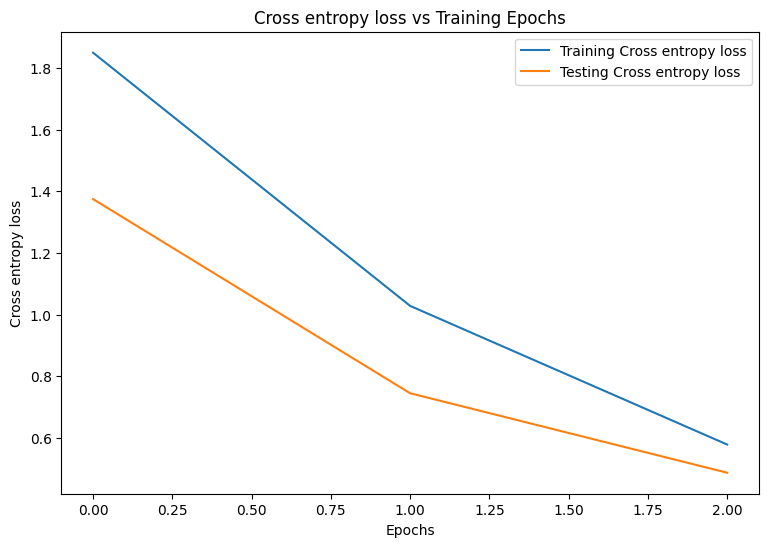
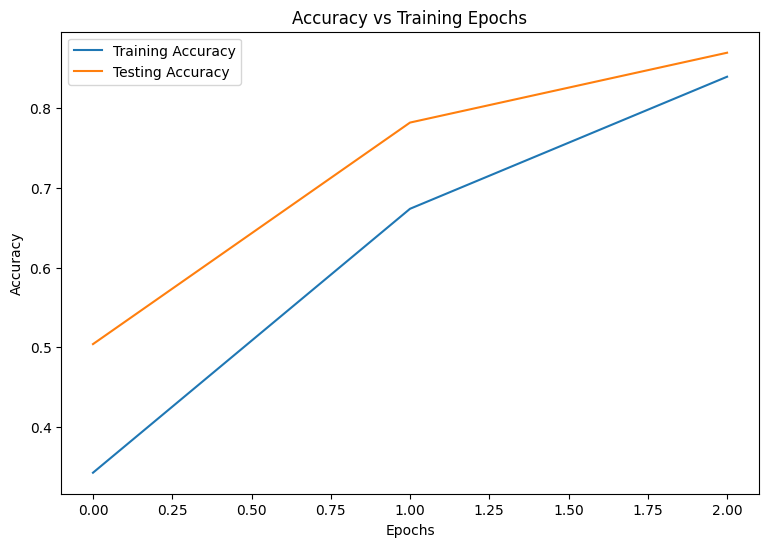
Training loss: 1.850, Training accuracy: 0.343
Testing loss: 1.375, Testing accuracy: 0.504
Epoch: 1
Training loss: 1.028, Training accuracy: 0.674
Testing loss: 0.744, Testing accuracy: 0.782
Epoch: 2
Training loss: 0.578, Training accuracy: 0.839
Testing loss: 0.486, Testing accuracy: 0.869
性能评估
首先编写一个绘图函数,以可视化模型在训练期间的损失和准确率。
def plot_metrics(train_metric, test_metric, metric_type):
  # Visualize metrics vs training Epochs
  plt.figure()
  plt.plot(range(len(train_metric)), train_metric, label = f"Training {metric_type}")
  plt.plot(range(len(test_metric)), test_metric, label = f"Testing {metric_type}")
  plt.xlabel("Epochs")
  plt.ylabel(metric_type)
  plt.legend()
  plt.title(f"{metric_type} vs Training Epochs");
plot_metrics(train_losses, test_losses, "Cross entropy loss")
plot_metrics(train_accs, test_accs, "Accuracy")
保存您的模型
tf.saved_model 和 DTensor 的集成仍在开发中。截至 TensorFlow 2.9.0,tf.saved_model 仅接受具有完全复制变量的 DTensor 模型。作为一种解决方法,您可以通过重新加载检查点将 DTensor 模型转换为完全复制的模型。但是,在保存模型后,所有 DTensor 注释都会丢失,并且保存的签名只能与常规张量一起使用。本教程将在集成稳定后更新以展示集成。
结论
此笔记本概述了使用 DTensor 和 TensorFlow Core API 进行分布式训练。以下是一些可能有所帮助的额外提示
- TensorFlow Core API 可用于构建高度可配置的机器学习工作流,并支持分布式训练。
- DTensor 概念 指南和 使用 DTensor 进行分布式训练 教程包含有关 DTensor 及其集成的最新信息。
有关使用 TensorFlow Core API 的更多示例,请查看 指南。如果您想了解有关加载和准备数据的更多信息,请查看有关 图像数据加载 或 CSV 数据加载 的教程。