
此“独立”笔记本演示了在没有 TFX/MLMD 上下文的情况下使用模型卡工具包。
 在 TensorFlow.org 上查看 在 TensorFlow.org 上查看
|
 在 Google Colab 中运行 在 Google Colab 中运行
|
 在 GitHub 上查看 在 GitHub 上查看
|
 下载笔记本 下载笔记本
|
目标
此笔记本演示了如何在 Jupyter/Colab 环境中使用模型卡工具包生成模型卡。您可以在 https://modelcards.withgoogle.com/about 了解有关模型卡的更多信息
我们在本演示中使用 Keras 模型。但以下逻辑也适用于其他 ML 框架。
设置
首先,我们需要 a) 安装并导入必要的软件包,以及 b) 下载数据。
升级 Pip 并安装模型卡工具包
pip install --upgrade pippip install 'model-card-toolkit>=1.0.0'pip install 'tensorflow>=2.3.1'pip install 'tensorflow-datasets>=4.8.2'
您是否重新启动了运行时?
如果您使用的是 Google Colab,则第一次运行上面的单元格时,您必须重新启动运行时(运行时 > 重新启动运行时...)。这是因为 Colab 加载软件包的方式。
导入
import tensorflow as tf
import numpy as np
import model_card_toolkit as mct
from model_card_toolkit.documentation.examples import cats_vs_dogs
from model_card_toolkit.utils.graphics import figure_to_base64str
import tempfile
import matplotlib.pyplot as plt
from IPython import display
import requests
import os
import zipfile
模型
我们将使用一个预训练模型,其架构基于 MobileNetV2,这是一个流行的 16 层图像分类模型。我们的模型经过训练,可以区分使用 猫狗 数据集的猫和狗。模型训练基于 TensorFlow 转移学习教程。
URL = 'https://storage.googleapis.com/cats_vs_dogs_model/cats_vs_dogs_model.zip'
BASE_PATH = tempfile.mkdtemp()
ZIP_PATH = os.path.join(BASE_PATH, 'cats_vs_dogs_model.zip')
MODEL_PATH = os.path.join(BASE_PATH,'cats_vs_dogs_model')

r = requests.get(URL, allow_redirects=True)
open(ZIP_PATH, 'wb').write(r.content)

with zipfile.ZipFile(ZIP_PATH, 'r') as zip_ref:
    zip_ref.extractall(BASE_PATH)

model = tf.keras.models.load_model(MODEL_PATH)
WARNING:tensorflow:SavedModel saved prior to TF 2.5 detected when loading Keras model. Please ensure that you are saving the model with model.save() or tf.keras.models.save_model(), *NOT* tf.saved_model.save(). To confirm, there should be a file named "keras_metadata.pb" in the SavedModel directory.
WARNING:tensorflow:SavedModel saved prior to TF 2.5 detected when loading Keras model. Please ensure that you are saving the model with model.save() or tf.keras.models.save_model(), *NOT* tf.saved_model.save(). To confirm, there should be a file named "keras_metadata.pb" in the SavedModel directory.
2023-10-03 09:12:20.736066: W tensorflow/core/common_runtime/gpu/gpu_device.cc:1960] Cannot dlopen some GPU libraries. Please make sure the missing libraries mentioned above are installed properly if you would like to use GPU. Follow the guide at https://tensorflowcn.cn/install/gpu for how to download and setup the required libraries for your platform.
Skipping registering GPU devices...
数据集
在猫狗数据集中,标签=0 对应于猫,而标签=1 对应于狗。
def compute_accuracy(data):
  x = np.stack(data['examples'])
  y = np.asarray(data['labels'])
  _, metric = model.evaluate(x, y)
  return metric
examples = cats_vs_dogs.get_data()
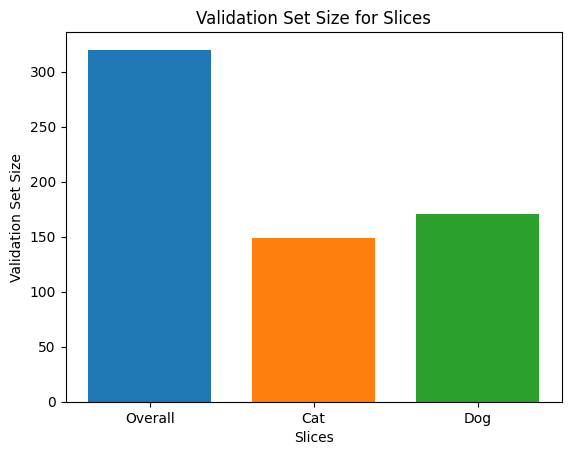
print('num validation examples:', len(examples['combined']['examples']))
print('num cat examples:', len(examples['cat']['examples']))
print('num dog examples:', len(examples['dog']['examples']))
num validation examples: 320
num cat examples: 149
num dog examples: 171
2023-10-03 09:12:30.081069: W tensorflow/core/kernels/data/cache_dataset_ops.cc:854] The calling iterator did not fully read the dataset being cached. In order to avoid unexpected truncation of the dataset, the partially cached contents of the dataset  will be discarded. This can happen if you have an input pipeline similar to `dataset.cache().take(k).repeat()`. You should use `dataset.take(k).cache().repeat()` instead.
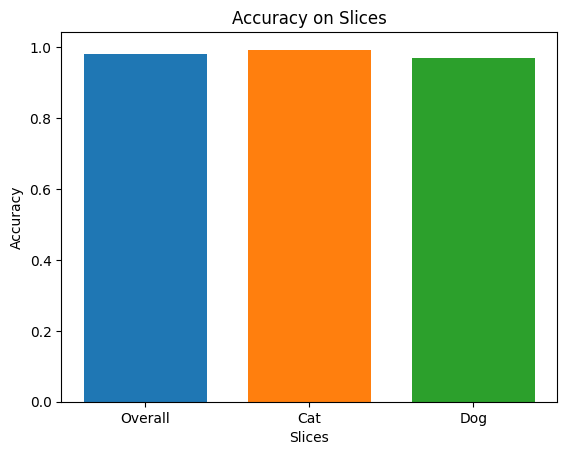
accuracy = compute_accuracy(examples['combined'])
cat_accuracy = compute_accuracy(examples['cat'])
dog_accuracy = compute_accuracy(examples['dog'])
10/10 [==============================] - 2s 77ms/step - loss: 0.0794 - binary_accuracy: 0.9812
5/5 [==============================] - 1s 74ms/step - loss: 0.0608 - binary_accuracy: 0.9933
6/6 [==============================] - 0s 65ms/step - loss: 0.0956 - binary_accuracy: 0.9708
使用模型卡工具包
初始化模型卡工具包
第一步是初始化一个 ModelCardToolkit 对象,它维护资产,包括 模型卡 JSON 文件 和 模型卡文档。调用 ModelCardToolkit.scaffold_assets() 生成这些资产并返回一个 ModelCard 对象。
# https://github.com/tensorflow/model-card-toolkit/blob/master/model_card_toolkit/model_card_toolkit.py
model_card_dir = tempfile.mkdtemp()
toolkit = mct.ModelCardToolkit(model_card_dir)

# https://github.com/tensorflow/model-card-toolkit/blob/master/model_card_toolkit/model_card.py
model_card = toolkit.scaffold_assets()
注释模型卡
由 scaffold_assets() 返回的 ModelCard 对象具有许多可以直接修改的字段。这些字段在最终生成的模型卡文档中呈现。有关完整列表,请参阅 model_card.py。有关更多详细信息,请参阅 文档。
文本字段
模型详细信息
model_card.model_details 包含许多基本元数据字段,例如 name、owners 和 version。您可以在 overview 字段中提供模型的描述。
model_card.model_details.name = 'Fine-tuned MobileNetV2 Model for Cats vs. Dogs'
model_card.model_details.overview = (
    'This model distinguishes cat and dog images. It uses the MobileNetV2 '
    'architecture (https://arxiv.org/abs/1801.04381) and is trained on the '
    'Cats vs Dogs dataset '
    '(https://tensorflowcn.cn/datasets/catalog/cats_vs_dogs). This model '
    'performed with high accuracy on both Cat and Dog images.'
)
model_card.model_details.owners = [
  mct.Owner(name='Model Cards Team', contact='model-cards@google.com')
]
model_card.model_details.version = mct.Version(name='v1.0', date='08/28/2020')
model_card.model_details.references = [
    mct.Reference(reference='https://tensorflowcn.cn/guide/keras/transfer_learning'),
    mct.Reference(reference='https://arxiv.org/abs/1801.04381'),
]
model_card.model_details.licenses = [mct.License(identifier='Apache-2.0')]
model_card.model_details.citations = [mct.Citation(citation='https://github.com/tensorflow/model-card-toolkit/blob/master/model_card_toolkit/documentation/examples/Standalone_Model_Card_Toolkit_Demo.ipynb')]
定量分析
model_card.quantitative_analysis 包含有关模型性能指标的信息。
下面,我们为基于我们数据集的假设模型创建一些合成性能指标值。
model_card.quantitative_analysis.performance_metrics = [
  mct.PerformanceMetric(type='accuracy', value=str(accuracy)),
  mct.PerformanceMetric(type='accuracy', value=str(cat_accuracy), slice='cat'),
  mct.PerformanceMetric(type='accuracy', value=str(dog_accuracy), slice='Dog'),
]
注意事项
model_card.considerations 包含有关模型的限定信息 - 适当的用例是什么,用户应该注意哪些限制,应用的伦理考虑是什么,等等。
model_card.considerations.use_cases = [
    mct.UseCase(description='This model classifies images of cats and dogs.')
]
model_card.considerations.limitations = [
    mct.Limitation(description='This model is not able to classify images of other classes.')
]
model_card.considerations.ethical_considerations = [mct.Risk(
    name=
        'While distinguishing between cats and dogs is generally agreed to be '
        'a benign application of machine learning, harmful results can occur '
        'when the model attempts to classify images that don’t contain cats or '
        'dogs.',
    mitigation_strategy=
        'Avoid application on non-dog and non-cat images.'
)]
图形字段
通常,最好在报告中提供有关模型训练数据及其在评估数据上的性能的信息。模型卡工具包允许用户将此信息编码在可视化中,并在模型卡中呈现。
model_card 有三个用于图形的部分 - model_card.model_parameters.data.train.graphics 用于训练数据集统计信息,model_card.model_parameters.data.eval.graphics 用于评估数据集统计信息,以及 model_card.quantitative_analysis.graphics 用于模型性能的定量分析。
图形存储为 base64 字符串。如果您有 matplotlib 图形,您可以使用 model_card_toolkit.utils.graphics.figure_to_base64str() 将其转换为 base64 字符串。
# Validation Set Size Bar Chart
fig, ax = plt.subplots()
width = 0.75
rects0 = ax.bar(0, len(examples['combined']['examples']), width, label='Overall')
rects1 = ax.bar(1, len(examples['cat']['examples']), width, label='Cat')
rects2 = ax.bar(2, len(examples['dog']['examples']), width, label='Dog')
ax.set_xticks(np.arange(3))
ax.set_xticklabels(['Overall', 'Cat', 'Dog'])
ax.set_ylabel('Validation Set Size')
ax.set_xlabel('Slices')
ax.set_title('Validation Set Size for Slices')
validation_set_size_barchart = figure_to_base64str(fig)
# Acuracy Bar Chart
fig, ax = plt.subplots()
width = 0.75
rects0 = ax.bar(0, accuracy, width, label='Overall')
rects1 = ax.bar(1, cat_accuracy, width, label='Cat')
rects2 = ax.bar(2, dog_accuracy, width, label='Dog')
ax.set_xticks(np.arange(3))
ax.set_xticklabels(['Overall', 'Cat', 'Dog'])
ax.set_ylabel('Accuracy')
ax.set_xlabel('Slices')
ax.set_title('Accuracy on Slices')
accuracy_barchart = figure_to_base64str(fig)
现在,我们可以将它们添加到我们的 ModelCard 中。
model_card.model_parameters.data.append(mct.Dataset())
model_card.model_parameters.data[0].graphics.collection = [
  mct.Graphic(name='Validation Set Size', image=validation_set_size_barchart),
]
model_card.quantitative_analysis.graphics.collection = [
  mct.Graphic(name='Accuracy', image=accuracy_barchart),
]
生成模型卡
让我们生成模型卡文档。可用格式存储在 model_card_toolkit/template 中。在这里,我们将演示 HTML 和 Markdown 格式。
首先,我们需要使用最新的 ModelCard 更新 ModelCardToolkit。
toolkit.update_model_card(model_card)
现在,ModelCardToolkit 可以使用 ModelCardToolkit.export_format() 生成模型卡文档。
# Generate a model card document in HTML (default)
html_doc = toolkit.export_format()

# Display the model card document in HTML
display.display(display.HTML(html_doc))
您还可以以其他格式输出模型卡,例如 Markdown。
# Generate a model card document in Markdown
md_path = os.path.join(model_card_dir, 'template/md/default_template.md.jinja')
md_doc = toolkit.export_format(template_path=md_path, output_file='model_card.md')

# Display the model card document in Markdown
display.display(display.Markdown(md_doc))
针对猫狗的微调 MobileNetV2 模型的模型卡
模型详细信息
概述
此模型区分猫和狗图像。它使用 MobileNetV2 架构 (https://arxiv.org/abs/1801.04381),并在猫狗数据集 (https://tensorflowcn.cn/datasets/catalog/cats_vs_dogs) 上进行训练。此模型在猫和狗图像上都具有很高的准确率。
版本
名称:v1.0
日期:2020 年 8 月 28 日
所有者
- 模型卡团队,model-cards@google.com
许可证
- Apache-2.0
参考
引用
注意事项
用例
- 该模型用于对猫和狗的图像进行分类。
局限性
- 该模型无法对其他类别的图像进行分类。
伦理考量
- 风险:虽然区分猫和狗通常被认为是机器学习的良性应用,但当模型试图对不包含猫或狗的图像进行分类时,可能会产生有害的结果。
- 缓解策略:避免在非猫和非狗图像上应用该模型。
图形
验证集大小

准确率

指标
| 名称 | 值 |
|---|---|
| 准确率 | 0.981249988079071 |
| 猫的准确率 | 0.9932885766029358 |
| 狗的准确率 | 0.9707602262496948 |